
Participant
June 24, 2019
Answered

"The operation cannot complete due to an unknown error" and or Ai crashes when pasting from Graphpad

  • June 24, 2019
  • 3 replies
  • 5063 views

I had experienced Ai crashing everytime I pasted a graph from Graphpad, this only started recently. Since I updated Ai I get the "The operation cannot complete due to an unknown error" message. What is going on!?
    Correct answer thinkCara1

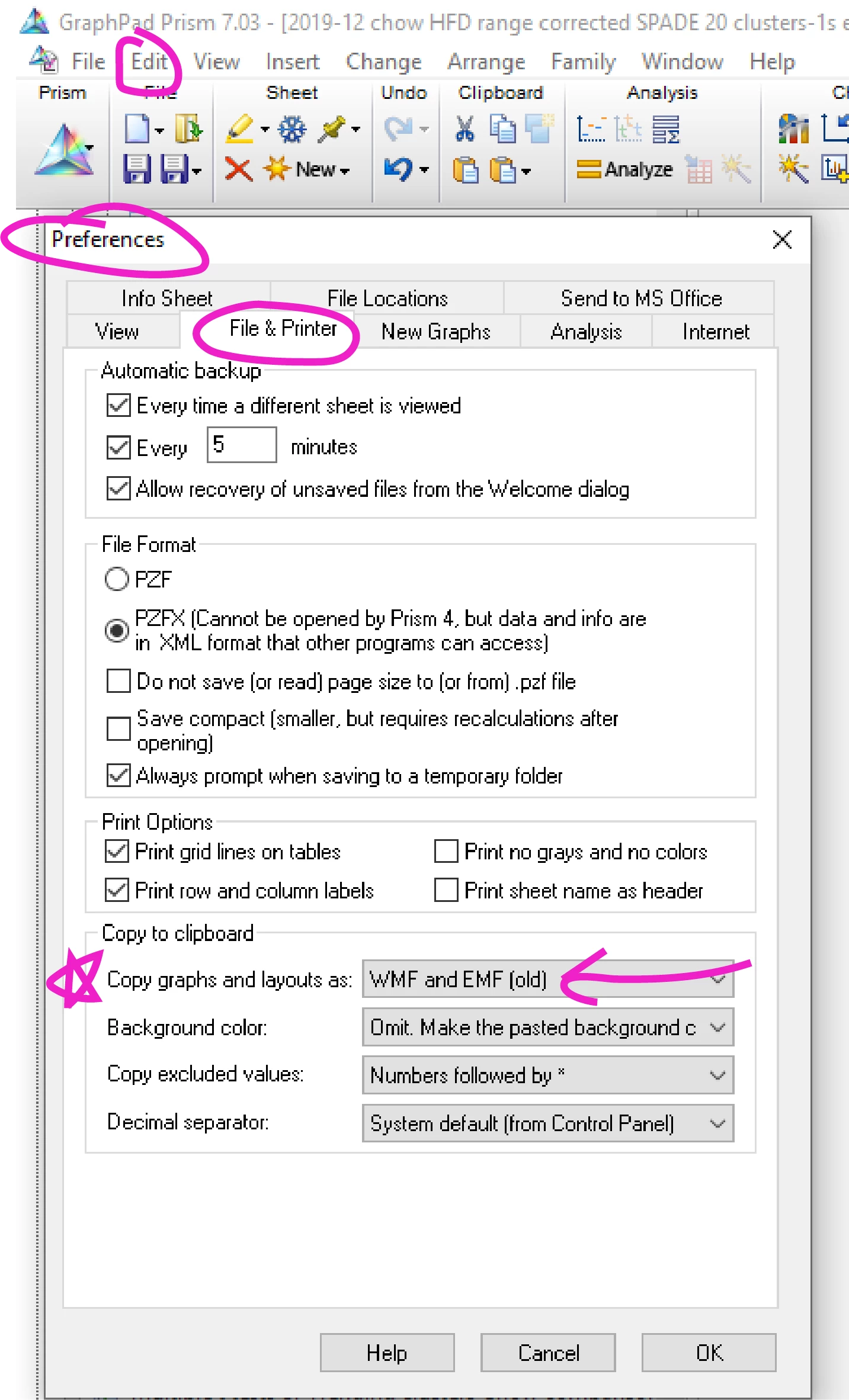
    If you are struggling with pasting GraphPad Prism graphs into Adobe Illustrator, try to change the copy settings in Graphpad Prism. Go to: Edit --> Preferences... --> File&Printer --> and then change "Copy graphs and layouts as:" to "WMF and EMF (old)". The EMF+ (new version) breaks things when pasting into Adobe Illustrator.

    3 replies

    thinkCara1Correct answer
    Participant
    December 16, 2019

    If you are struggling with pasting GraphPad Prism graphs into Adobe Illustrator, try to change the copy settings in Graphpad Prism. Go to: Edit --> Preferences... --> File&Printer --> and then change "Copy graphs and layouts as:" to "WMF and EMF (old)". The EMF+ (new version) breaks things when pasting into Adobe Illustrator.
    Participant
    December 25, 2020

    This totally worked for me.

    Thank you!

    Bill Silbert
    Community Expert
    Community Expert
    June 24, 2019

    What operating system are you using? Are the graphs the same size as ones you pasted prior to your update. Was your update to the latest version of Illustrator (23.0.3)? Have you tried restarting your computer?

    Srishti Bali
    Community Manager
    Community Manager
    June 24, 2019

    Hi Sean,

    Thanks for reaching out. As per your query Illustrator is crashing while you are copy-pasting a graph from Graphpad. To help you further with this I would need a few more details like:

    • OS (exact version of Windows/MAC)
    • Version of Illustrator
    • Is it happening while pasting a particular graph/document? Please try pasting a different graph on a new document and let us know that helps.

    Regards,

    Srishti

    Participant
    June 24, 2019

    Hi,

    OS is Windows 10 version 1803

    Ai version is 23.0.3 (Ai CC v 22.1)

    It crashed when i tried to copy the graph into a new Ai file, and the diagnostics crashed while running.

    Srishti Bali
    Community Manager
    Community Manager
    June 25, 2019

    Thanks for sharing this information. I would request if you can share a few more details like:


    • Where the files are saved (Network Drive/ System HDD/ Shared Folder on System /External HDD)?
    • Has this issue appeared recently? Was it working fine earlier? Are there any recent changes made to your system? For example, any antivirus, system updates or web extensions installed recently.
    • Could you please share a sample file with us?
    • Does resetting Illustrator Preferences (https://helpx.adobe.com/in/illustrator/using/setting-preferences.html) help resolve the issue? Please do take a backup of the same before trashing them and share it with us. You can zip the folders, upload it to creative cloud and share the download link.

    Regards,

    Srishti