

TenTin
Inspiring
April 17, 2023
Question

Thin Black Outline!

  • April 17, 2023
  • 1 reply
  • 2217 views

Why Ai adds a thin black outline to the shape (with a solid fill colour) after adding a gradient fill (Appearance Panel) to it!

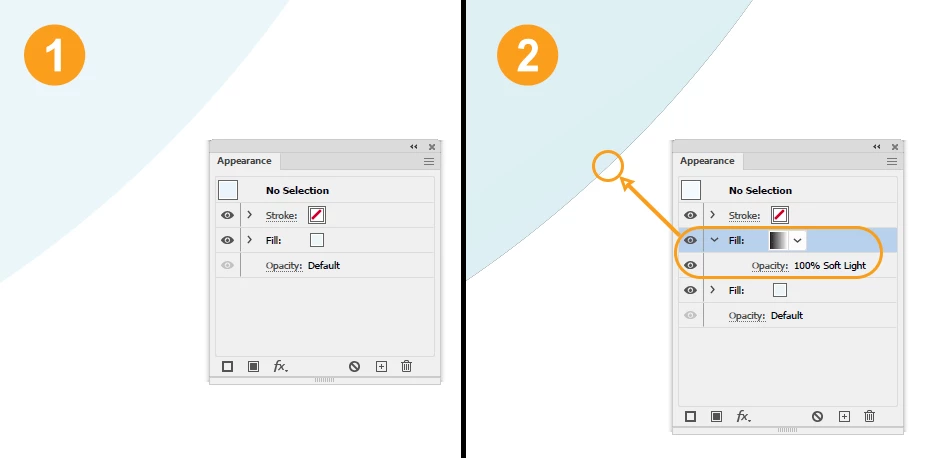
I have a shape with a fill (solid) colour (img 1), adding a gradient fill (blending mode: softlight) to it (img 2), then it adds a thin black outline to the shape!

I add a gradient (black and white, softlight) to change only the fill colour not the gradient attributes (if I decide to change the shape's colour, the shade is fixed, the fill colour changes). 
 

This topic has been closed for replies.

1 reply

Monika Gause
Community Expert
Community Expert
April 17, 2023

Does that stay when you go to View > Preview on CPU?

TenTin
TenTinAuthor
Inspiring
April 17, 2023

Yes. At first I thought it's the GPU glitch (as always in Ai), but no! The problem is when you bring it in Ps and make it larger (as Smart Object) it gets worse.

Larry G. Schneider
Community Expert
Community Expert
April 17, 2023

Probably an antialiasing problem. If you turn off antialiasing, does it go away?