
Todd_Morgan
Legend
September 21, 2023
Question

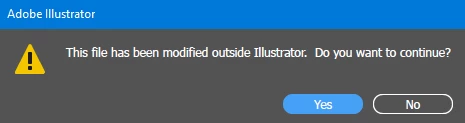
THIS FILE HAS BEEN MODIFIED OUTSIDE ILLUSTRATOR??
  • September 21, 2023
  • 2 replies
  • 1224 views

PLEASE FIX THIS SOMETIME SOON....

This topic has been closed for replies.

2 replies

Known Participant
February 2, 2024

I was browsing other answers (update to latest version mostly) but my version of AI is 28.1 and well beyond what was previously referenced.

I can Save As... a file and then seconds later hit Save and get the "This file has been modified outside Illustrator." error.  Yes, I'm saving to a network drive, but there is no one mucking with my files in the 1.5 seconds it took to test if this would pop up again. I'm running Sonoma 14.1.2 [I wish I hadn't had to update since it is making all sorts of problems with inDesign, but I had to update because I had other softeware that was refusing to work with the older OS].  The only thing running that could be considered a plug in would be my Connect Fonts application.


Why are we getting this error and is there a way to stop it?

Monika Gause
Community Expert
Community Expert
February 2, 2024

The fact that you are saving to a network drive alone can cause that.

Known Participant
February 9, 2024

Could you explain then, why it wouldn't happen with every file?  It seems to happen most with files created in an older version of Illustrator.

Monika Gause
Community Expert
Community Expert
September 21, 2023

Which Windows is this?

Where has the file been saved?


Is the preview in the Explorer visible. You might want to turn it off.

Anubhav M
Community Manager
Community Manager
December 23, 2023

Hello @Todd Morgan,

Sorry to hear about your experience. Would you mind sharing some more details, like the exact version of the OS/Illustrator, the file/folder location, and details about your workflow, as suggested by Monika, so we can investigate this further?


Looking forward to hearing from you.


Thanks,

Anubhav
