
Known Participant
February 15, 2019
Answered

Thumbnails missing and cannot open layers

  • February 15, 2019
  • 3 replies
  • 1732 views

I was working on my file and all of a sudden something happened to the layers panel - the thumbnails are missing, cannot open or collapse layers, unable to lock/unlock, unable to change the visibility of layers.
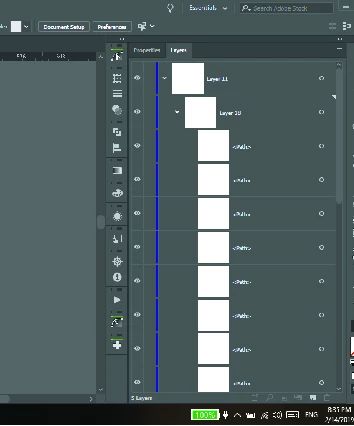
What happened? And how do I fix it?

Thanks

This topic has been closed for replies.
Correct answer Monika Gause

Yes. It just seems to be this file. I'm not sure what I did to cause this to happen.


Please try and copy all the objects into a new file and see if it works then.

3 replies

Known Participant
April 16, 2019

"I was working on my file and all of a sudden something happened to the layers panel - the thumbnails are missing, cannot open or collapse layers, unable to lock/unlock, unable to change the visibility of layers."

I posted this back in February and still have not received a response as to why it continues to occur and how to fix it.

I have already restarted my computer and I have copied all the objects to a new file. This time the new file has the same issues. All the empty thumbnails you see have content.

Sure hope someone has a solution to this.

Monika Gause
Community Expert
Community Expert
April 16, 2019

Do you use any third party plugins?

What kind of objects are in your file?

How large is your file?

Do you restart the computer regularly?

Have you already rebuilt the preferences?

Known Participant
April 17, 2019

Thanks for getting back to me, Monika.

Do you use any third party plugins? Yes. I use Astute Graphics plugins.

What kind of objects are in your file? I have used only the pen tool,

pencil tool, and the shape tools - nothing out of the ordinary.

How large is your file? Interesting - the original file (the corrupted

file) is 31.79 MB and the new file to which I copied the drawing is 1.28

MB...

Do you restart the computer regularly? Yes. I shut down the computer each

day.

Have you already rebuilt the preferences? Not sure what you mean by

"rebuilt"

On Tue, Apr 16, 2019 at 12:54 PM Monika Gause <forums_noreply@adobe.com>

rcraighead
Legend
February 16, 2019

If you still have the problem file, I wonder if changing the "Layer" Panel Options would make them re-appear?

Known Participant
February 16, 2019

Change them to what?

Monika Gause
Community Expert
Community Expert
February 15, 2019

Are they still there on the artboard?

Next time you post a screenshot, please don't scale it down. You can hardly read it.

Known Participant
February 15, 2019

Yes, the artwork for the open layers are on the art board. Sorry for the small screenshot.

Monika Gause
Community Expert
Community Expert
February 15, 2019

Have you already tried a computer restart?