Sieplo
Participant
June 21, 2018
Answered

To place layer names in SVG-file Illustrator

  • June 21, 2018
  • 1 reply
  • 739 views

Hi,

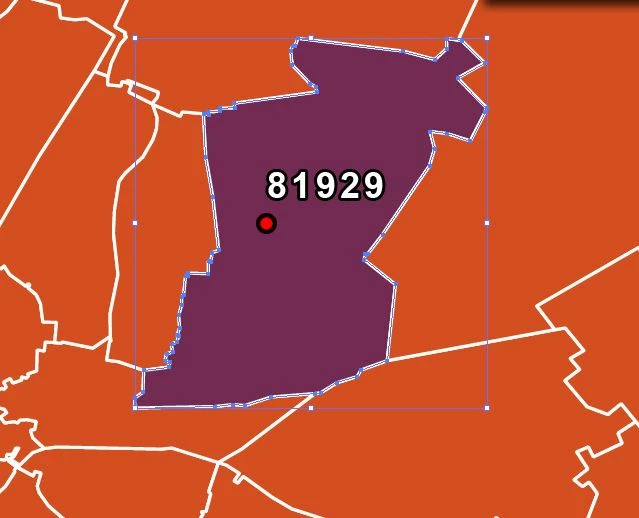
I have a question about placing tekst in a SVG-file with Illustrator. It have a SVG-file with zip-code boundaries from Germany. I will color the border to a make separation between some regions. The problem is that the zip-codes (the text) are not visible in the file. All the seperate layers have a unique name, the zip-code. What I need is the name of the layer show in the map. See for example the both pictures. Picture 1 is the situation now, Picture 2 is the situation I want. Can anyone tel me why I can realize this?

Thanks!

    This topic has been closed for replies.
    Correct answer Monika Gause

    You will need to type the ZIP codes into the file.

    Maybe a script can do that as well, but it will have to be written first.

    If you don't want the file on the web, save it as an AI file.

    1 reply

    Monika Gause
    Community Expert
    Community Expert
    June 21, 2018

    Please show the contents of the layer panel. Perhaps the layers are turned off?

    Also: You will be editing the file - Do you need to use it interactively on a web page afterwards? I'm asking because by opening the file in Illustrator (and re-saving it) you might lose features of the file that have been edited into it.

    Sieplo
    SieploAuthor
    Participant
    June 22, 2018

    See the image below for the layer panel.

    I don't need interactivity in the file. It is only for offline use and printing.

    Monika Gause
    Community Expert
    Monika GauseCommunity ExpertCorrect answer
    Community Expert
    June 22, 2018

    You will need to type the ZIP codes into the file.

    Maybe a script can do that as well, but it will have to be written first.

    If you don't want the file on the web, save it as an AI file.