
Known Participant
November 2, 2016
Answered

Too many anchor points after expand

  • November 2, 2016
  • 2 replies
  • 3122 views

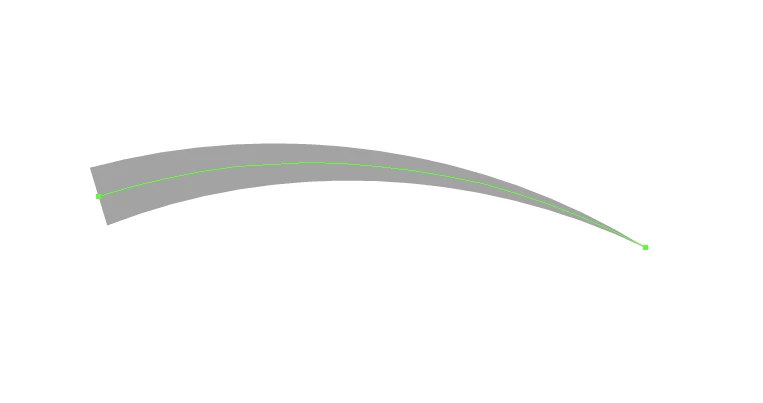
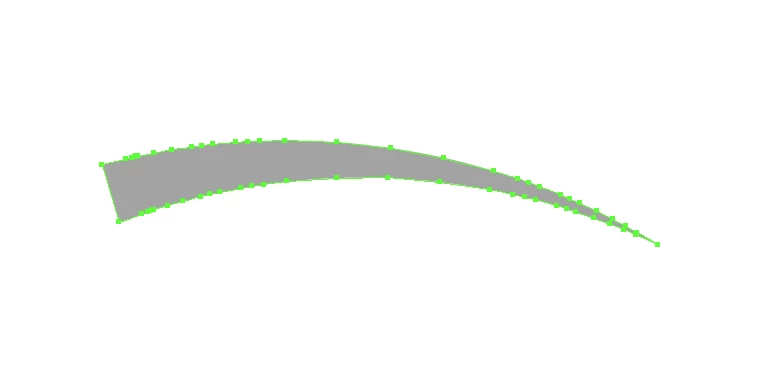
Here is a stroke with variable width profile 4. When I expand the stroke, Illustrator produces a whole bunch of unnecessary points. Why isn't Illustrator capable of producing a lesser amount of points? Is it a bug? I would understand the amount of points if the stroke had rough edges, but this is a predefined variable width profile. Are there any settings where I can change this? I can't remember this being an issue before.
This topic has been closed for replies.
Correct answer michellen78583256

michellen,


you applied an Envelope Distort through the Object menu, didn't you?


If so, you may take a look at the Envelope Options dialog. There is a fidelity section. The higher you set the fidelity there, the more anchor points you get after expanding the envelope. Play a bit with this setting and check how it will reduce the number of anchor points of the expanded object.


Also, take a look at the Warp effects in the Effect menu. Usually they produce pretty clean results after expanding their appearance in the Object menu.


Thank you! Looks like that was the issue. It was at 100. I changed it to 50 and got a normal amount of points.


We need to use envelopes as part of our workflow. They hold the integrity of the shape better than just the warp effect. These are all pre-existing elements that I'm working with, so I don't have much flexibilty.


Thank you so much! 

2 replies

Kris Hunt
Legend
November 2, 2016

It has always been an issue. The best way to fix it is with the Smart Remove Brush, which is part of the VectorScribe toolset from Astute Graphics.

Participant
September 30, 2019
I know this comment is three years old but this wasn't always an issue. I just upgraded from CS6 to CC and this never happened in CS6. The stroke in the top image would have been expanded to maybe 5 points instead of dozens. I've been searching for a solution myself because this is ridiculous.
Known Participant
August 20, 2024

Hi, has a solution been found for this issue yet? Or perhaps there’s a smart workaround?

Larry G. Schneider
Community Expert
Community Expert
November 2, 2016

You could try Object>Path>Simplify and work with the options there.