Participant
September 30, 2021
Question

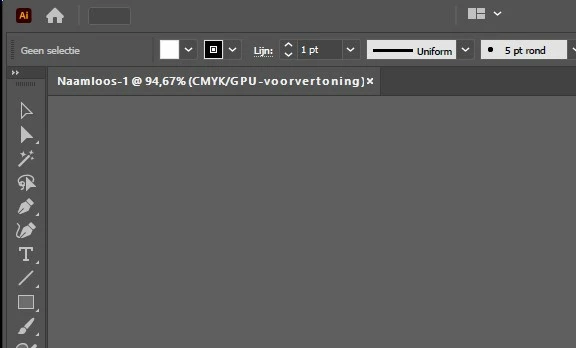
Toolbar words not visible
  • September 30, 2021
  • 2 replies
  • 243 views


Hello, I have a problem with my toolbar, can't see the words on it (see image). 

Does anyone know how I can solve this? 

This topic has been closed for replies.

2 replies

tromboniator
Community Expert
Community Expert
October 1, 2021

If I understand you correctly, I do not believe there is any provision for tools in the Toolbar to display their names except as a Tooltip when the cursor hovers over one of the icons. If that is not happening, you can activate it in Preferences > General > Show Tooltips.


Peter

Anshul_Saini
Community Manager
Community Manager
October 1, 2021

Hi @tromboniator,

Esther is talking about the menu bar, I think. File, Edit, Object, etc. Menu names/ words are not visible.


Regards,

Anshul Saini

tromboniator
Community Expert
Community Expert
October 1, 2021

Thanks, @Anshul_Saini, you're right.


Peter

Anshul_Saini
Community Manager
Community Manager
September 30, 2021

Hi there,


Sorry about the trouble. You may try resetting the Illustrator Preferences (https://helpx.adobe.com/illustrator/using/setting-preferences.html) and let us know how it goes.
Disclaimer: Please note that resetting preferences will remove all the custom settings, and Illustrator will launch with default settings. You can also take a backup of the folders in case you want to. Location is mentioned in the article.


I will be looking forward to your response.


Regards,

Anshul Saini