
Participant
March 3, 2018
Answered

Transform Controls Not Showing with Direct Selection Tool

  • March 3, 2018
  • 5 replies
  • 6201 views

Ok, so this is a really weird thing I've been having problems with recently, my transform controls don't show up but only when I'm using the direct selection tool (which you can imagine is very inconvenient). I have tried everything I can think of and have gotten to the point where I might just try uninstalling a reinstall illustrator. If anyone can help would be supremely grateful.

Further note: this only seems to be on one file...
This topic has been closed for replies.
Correct answer jane-e

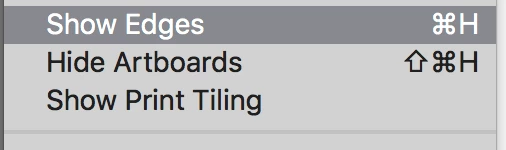
I can reproduce it with View > Show Edges (Cmd + H or Ctrl + H on Windows)

5 replies

Participant
April 3, 2018

You can also hold down the CTRL key to show edges as well but jane-e's answer is better.

Omar.Fathy
Community Expert
Community Expert
March 4, 2018

Yes TigerCat2​, It is happening sometimes when our document has a large number of paths, layers and more.

It happens with me and I used to treat with this normally I just Saving my file, Close the Ai app and open it again and it work will in most times. It can depends on PC specifications.

tromboniator
Community Expert
Community Expert
March 3, 2018

Does Object > Transform give you the control you need?

TigerCat2Author
Participant
March 4, 2018

Ok, this is an object in the file selected by the direct selection tool.

this is an object in a different file selected by the direct selection tool.

jane-e
Community Expert
jane-eCommunity ExpertCorrect answer
Community Expert
March 4, 2018

I can reproduce it with View > Show Edges (Cmd + H or Ctrl + H on Windows)

jane-e
Community Expert
Community Expert
March 3, 2018

Your transform controls don't show up when you have the Direct Selection tool? If I am reading you correctly, that is normal behavior.

They will show up with the Selection tool when the Bounding box is enabled.

What am I misunderstanding?

If you think the issue is Illustrator, then before uninstalling, try resetting Preferences if you haven't done that.

Monika Gause
Community Expert
Community Expert
March 3, 2018

You are referring to the bounding box?

TigerCat2Author
Participant
March 3, 2018

No, the bounding box is there and turned on.

Monika Gause
Community Expert
Community Expert
March 3, 2018

Can you please show what you are referring to?