
Transform line path weight after scaling
I have created a huge document of line paths (a navigational map).
Unfortunately, I realized too late that scaling only portions of the document creates a problem with other lines that weren't scaled.
To over-simplify an example: I have 2 lines, both being 2 pt weight: (A) is unscaled & skinny, and (B) is scaled & fat.
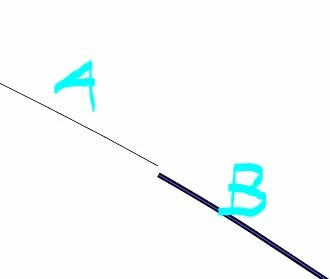
I understand I can change the weight individually, but they don't look the same, and of course the properties are out of sync.
Is there any way to homogenize all my lines to be the same? Same appearance, same weight, same properties, etc.
I now understand I should have checked my General preferences to "Scale Corners" & "Scale Strokes & Effects," but I'm a day late and a dollar short, and now on to damage control.
Am I stuck with a wonky document? Do I have to redraw? Or, (crossing fingers) is there a fix?
Any guidance would be appreciated 🙂
 AdChoices