


Known Participant
January 17, 2026
Answered

Transparency options greyed out when saving to .eps?

  • January 17, 2026
  • 2 replies
  • 171 views

Please see screenshot below. I need to be able to access the transparency options to resize my preset option when saving an Illustrator file to .eps (the printers use .eps files to work with their software, so saving to another file type is not an option). Can anyone tell me why these are greyed out and how I can fix that? THANK YOU SO MUCH!

Correct answer Mike_Gondek10189183

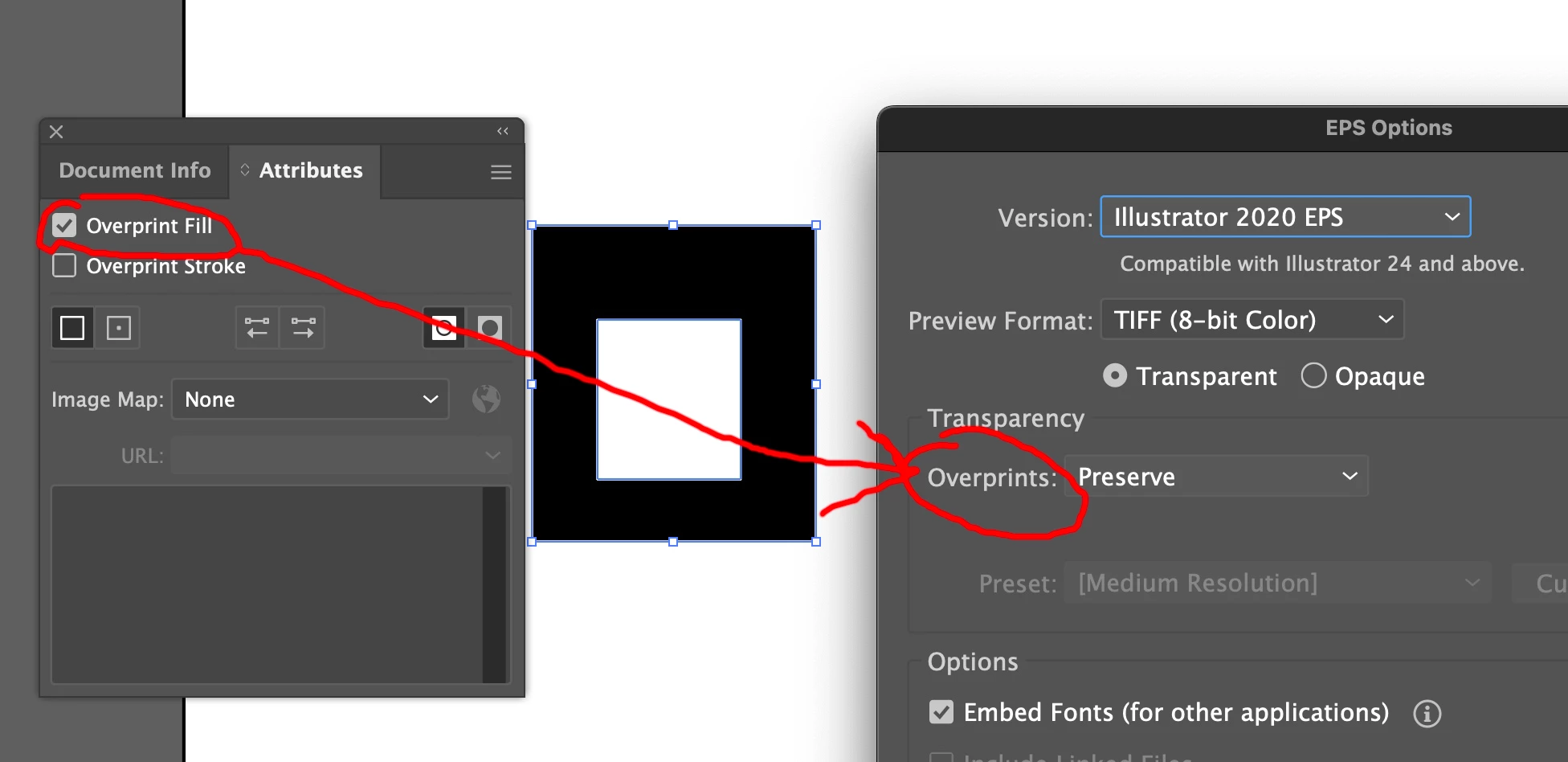
They are greyed when you don't have overprints. If you set an overprint it will appear.Mike_Gondek_0-1768703761114.png


Your file should be fine, give it a test. If you are having trouble, try saving a plain vector shape for a test. EPS is so old, I forget what the restrictions were like have a linked image, or a nested symbol. It has been over 2 decades since the industry was asked not to use EPS anymore.


2 replies

Mike_Gondek10189183
Community Expert
Mike_Gondek10189183Community ExpertCorrect answer
Community Expert
January 18, 2026

They are greyed when you don't have overprints. If you set an overprint it will appear.Mike_Gondek_0-1768703761114.png


Your file should be fine, give it a test. If you are having trouble, try saving a plain vector shape for a test. EPS is so old, I forget what the restrictions were like have a linked image, or a nested symbol. It has been over 2 decades since the industry was asked not to use EPS anymore.


Ton Frederiks
Community Expert
Community Expert
January 17, 2026

These are the transparency flattener presets. They only appear if you have used transparency in your file.

fahim7Author
Known Participant
January 17, 2026

no!! when I have transparency file it doesn't come!

solution?

Ton Frederiks
Community Expert
Community Expert
January 17, 2026

If you have used transparency percentages for objects or blending modes like Multiply it will show.

Clipping masks, compound paths and setting the fill of an object to none does not count as transparency, it is just the absence of color.