
ClarktoonCrossing
Participant
June 19, 2024
Question

Transparent Layers Keep Showing Up When I Don't Want Them To!

  • June 19, 2024
  • 3 replies
  • 396 views

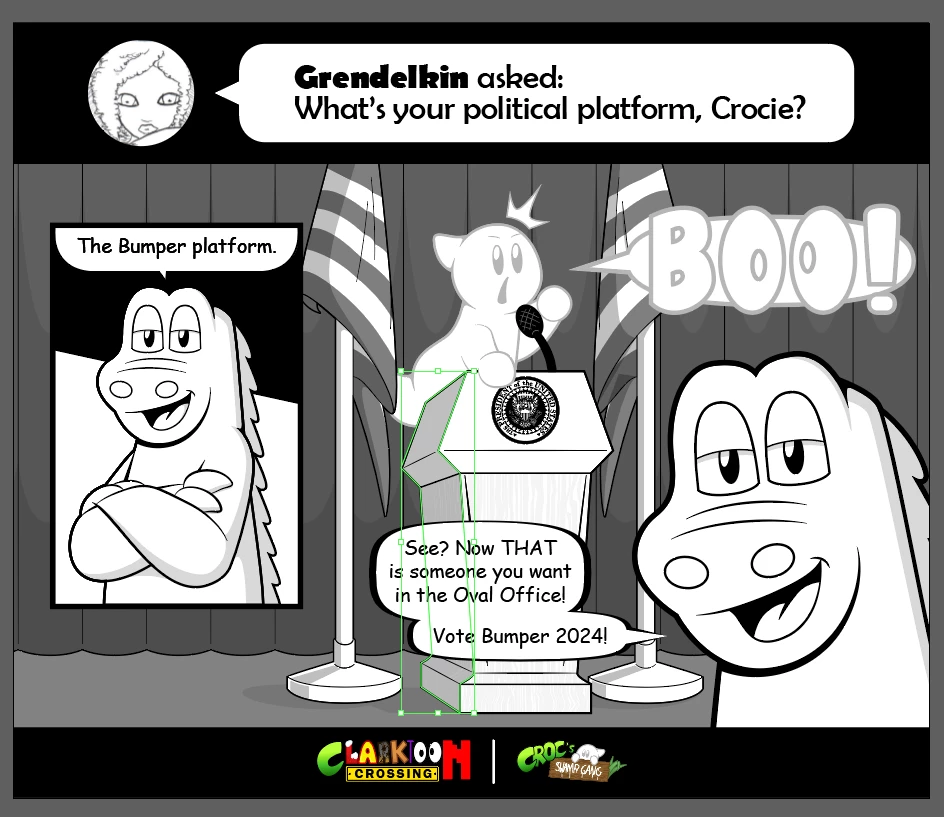
Illustrator continues to be a pain in my ass. I've tried exporting a comic I've made (left), but it keeps coming out look like it does on the right. The transparent layer on the flag keeps popping up through the other layers no matter how I try to export it. Please, for the love of everything, what do I do!?

 

This topic has been closed for replies.

3 replies

Ares Hovhannesyan
Community Expert
Community Expert
June 19, 2024

Please preview How to print and save transparent artwork in Illustrator (adobe.com)

You can use Flattener Preview panel overview for making correction.

kglad
Community Expert
Community Expert
June 19, 2024

in the future, to find the best place to post your message, use the list here, https://community.adobe.com/

p.s. i don't think the adobe website, and forums in particular, are easy to navigate, so don't spend a lot of time searching that forum list. do your best and we'll move the post (like this one has already been moved) if it helps you get responses.


<"moved from using the community bugs">
Inspiring
June 19, 2024

Check the overprint preview. Perhaps the object has the "overprinted" attribute.

ClarktoonCrossing
Participant
June 19, 2024

Just checked the Overprint Preview. Everything seems normal.

ClarktoonCrossing
Participant
June 19, 2024

And when I tried exporting it again, I still get the same result.