
Participating Frequently
March 2, 2017
Question

Trapping

  • March 2, 2017
  • 2 replies
  • 816 views

My trapping skills are a bit rusty and recently got a job that required a lot of trapping, so wasn't sure how to start.

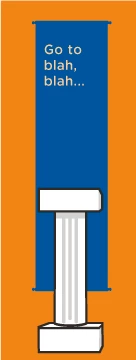
The job is 3 color: Pantone Black, Pantone 151 (Orange)  and Pantone 2935 (blue). The Orange is the background and there a some banner shaped objects with the blue over the orange as well as some pillars outlined in the black that overlap both the orange and blue. There is also some copy over the blue banners. The copy is 26pt type with a 40% tint of the orange--see below

So I understand the basics of trapping, of trapping light into dark. Also understand the basics of manual trapping whereby I duplicate an object, offset the path by the trap amount (positive or negative) and using overprint. Also know that Illustrator has a trap command under Pathfinder.

Where I'm confused is by the large trap amount I was asked to use—it's supposed to be 3/32". More specifically, they also want any key lines or any art that require trap to be a minimum of 3/16” thick to allow for 3/32” trap.

One of the blue banner shapes is designed like a banner hanging from a curtain rod, with knobs at each end. I tried duplicating this object and offsetting it -3/32", however that's too much inset for the knobs on each end of the banner. Also, 3/32" seems to be too much for the type as well.

I tried both manually and using the pathfinder trap command. Since the trap command uses points, isn't 3/32" the same as 6.5pt? If so, how do I deal with small objects or type with such a large stroke.

Any advice or a good tutorial would be appreciated
This topic has been closed for replies.

2 replies

Mike_Gondek10189183
Community Expert
Community Expert
March 2, 2017

What print process is this? Sounds closer to vinyl adhesive on vinyl than dye sub on fabric. But a vinyl person would want to do traps themselves so the miter edges, and for example choose orange vinyl as the first color with a  white vinyl before the back lines.

Your artwork is simple with thick lines which is very good for 3//32" traps.

6.75pt = 3/32"

Participating Frequently
March 17, 2017

It was for Flexo on corrugated. The area I was most unsure about was the little knobs at the ends of the blue banner. 3/32 seemed too big for this. The files go first to a pre-press house and they are the ones who complained that I didn't add the trap. Seems like that would be their  job, but...

Mike_Gondek10189183
Community Expert
Community Expert
March 17, 2017

Trapping should be handled by the printer, as every printer may have different trap amounts or they may prefer to mitre their traps rounded or square.

Most printers take responsibility and pride in the success of their work so they should want to trap themselves.  The only times I ever trapped something and I was not employed by the printer was along time ago for simple reals estate sign that were a repressive job and we came across that agreement to save costs and time. the other time was I sent a job to be printed at a place I worked formerly at, and they knew me and I was intimately familiar with their spec and press challenges.

PrepressPro1
Legend
March 2, 2017

What printing process are you having done? What print provider would have you trap a file? This trap seems excessively large unless this is printing on corrugated with Flexo. Your question about smaller traps – if your provider needs 3/32nds and you're trapping say the blue banner into the black of the black column object, you can only trap half way into the black lines.  Same with the orange at the bottom of the column. I would question the provider, why such a large trap, and ask why this is not a service they provide. Most printers will provide trapping spicific to the technology the job will be produced on.