kristyc88522982
Participant
November 21, 2016
Answered

Trouble Relinking Files - Maybe a Preset Issue?

  • November 21, 2016
  • 2 replies
  • 669 views

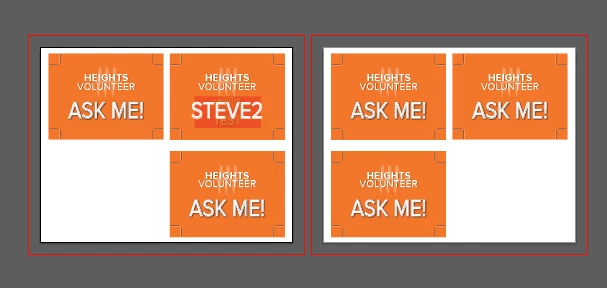
In the last month or so, I've been having issues with relinking files within older files. I use a main file to make sure it keeps the same dimensions and placement for printing, and just update the informational files within this main file. Recently, whenever I try to relink the informational files, it appears to place an outlined file and the new informational files I try to relink end up embedded within the old informational files. I've attached a picture to show what's happening better than I can describe.
    This topic has been closed for replies.
    Correct answer PrepressPro1

    Is it your intention to save the Illustrator files as PDF's. The Save Dialog you show is for saving as a PDF. When you link the file double check Place Dialog to make sure you have "Link" check box checked at the bottom.

    2 replies

    Larry G. Schneider
    Community Expert
    Community Expert
    November 22, 2016

    You didn't save the file with the Include Linked Files check box marked, did you?

    kristyc88522982
    Participant
    November 22, 2016

    I'm so sorry, but I can't find the check box you mean. Is it within this dialogue box?

    PrepressPro1
    PrepressPro1Correct answer
    Legend
    November 22, 2016

    Is it your intention to save the Illustrator files as PDF's. The Save Dialog you show is for saving as a PDF. When you link the file double check Place Dialog to make sure you have "Link" check box checked at the bottom.

    Kurt Gold
    Community Expert
    Community Expert
    November 21, 2016

    Which version of Illustrator are you using?

    Apart from that, I'm not quite sure what your screenshot is trying to tell in that case.

    Can you elaborate a bit?

    kristyc88522982
    Participant
    November 21, 2016

    I'm using CS 6. I'm struggling to find the right way to describe it, but I'll try my best. I have a file set up with crop marks called "Badge1," and I've placed Badge1 into another document for printing. I save it and close the file. I save Badge1 with changes, and then go to my printing document to update Badge1 (as a side note, when I save Badge1, this file no longer automatically updates in the printing document, though it used to before these issues came up). I click the link button with Badge1 selected, find the updated file, and place it. When that processed is finished, I'm left with the result seen in the picture from my original post. The file Badge1 appears in the first artboard on the upper right (the file with "Steve2" on it)--the updated Badge1 can be seen just behind the "Steve2" text, as if the updated Badge1 is embedded within the original Badge1 file.

    Along with (and probably related to) this relinking issue, there's no longer a complete thumbnail of the file in the links panel. In the thumbnail, the background of the file disappears when I relink the original Badge1with an updated version of Badge1, and only the text of the file appears in the thumbnail. Additionally, all other files that have not been updated since this issue began appear as linked files in the links panel, but the updated Badge1 appears as an embedded file. I mention this in hopes that it might have something to do with the issue.