
ManSolMarketing
Participant
September 22, 2020
Answered

Trying to create color overlay in clipping mask

  • September 22, 2020
  • 1 reply
  • 1292 views

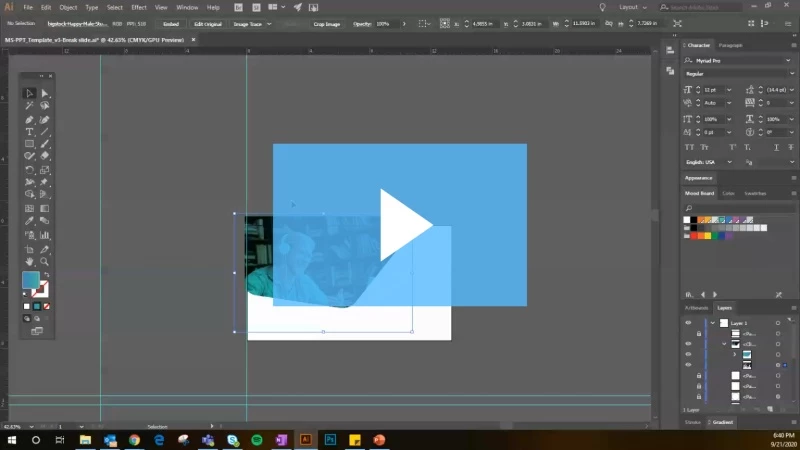
I have a template within Illustrator that a designer built for me. I do some design work but pretty basic and having trouble with this clipping mask.


Basically, they created it with a nice color overlay, but when I release the mask and try to use a new image and make the clip again, the blue green overlay goes away. How do I keep that color overlay? What am I missing/doing wrong?


Here is a quick 1 min video to show you: 
This topic has been closed for replies.
Correct answer Myra Ferguson

The easiest way to swap the image and retain the clip group and blend mode of the shape without even releasing the clip group would be to

  1. Select the image in the Layers panel (click to the right of the target dot)
  2. Open the Links panel (Window > Links)
  3. Go to the Links panel menu (the hamburger menu in the upper right)
  4. Select Relink... and navigate to the image you want to use

1 reply

Myra Ferguson
Community Expert
Myra FergusonCommunity ExpertCorrect answer
Community Expert
September 22, 2020

The easiest way to swap the image and retain the clip group and blend mode of the shape without even releasing the clip group would be to

  1. Select the image in the Layers panel (click to the right of the target dot)
  2. Open the Links panel (Window > Links)
  3. Go to the Links panel menu (the hamburger menu in the upper right)
  4. Select Relink... and navigate to the image you want to use
ManSolMarketing
Participant
September 25, 2020

Thank you very much!