

alzoin
Participating Frequently
October 4, 2022
Answered

Trying to curve/deforme some text in Illustrator

  • October 4, 2022
  • 2 replies
  • 704 views

Hi there,

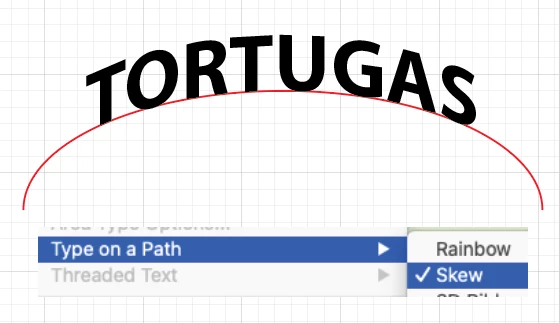
I am trying to reproduce the effect seen on the text «Tortugas» in the image bellow. We can see that the typo is deformed in a way that results in a kind of «curvy» text. Each single letter is deformed according to a «virtual curve».

Anyone knows how to achieve that in Illustrator? Version's 26.3.1

Thanks!
This topic has been closed for replies.
Correct answer kphotopage

Alzoin, Hi.


If you want your text curved and the characters to be vertical, another way is to use Type on a Path with Skew. (Type>Type on Path>Skew)


K

2 replies

kphotopage
kphotopageCorrect answer
Legend
October 5, 2022

Alzoin, Hi.


If you want your text curved and the characters to be vertical, another way is to use Type on a Path with Skew. (Type>Type on Path>Skew)


K

alzoin
alzoinAuthor
Participating Frequently
October 5, 2022

Ohhh yesh that is closer to what I am looking for. I guess a mix of the two options will be the best. Thanks!

alzoin
alzoinAuthor
Participating Frequently
October 4, 2022

Here is the said image:


Legend
October 4, 2022

That is an often-requested transformation that is missing from Illustrator's Envelope Distort. 

You can do an upper arch, or a lower arch with the letter edges still upright, but the full arch angles the letters outward. 

Monika Gause
Community Expert
Community Expert
October 4, 2022

The Arch should do it.