
Participant
August 23, 2017
Answered

Trying to make line graph, but problems with overlapping text on x-axis

  • August 23, 2017
  • 2 replies
  • 1145 views

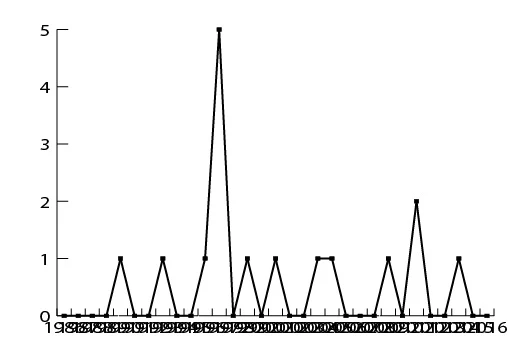
I am trying to create a line graph from 30 years' worth of data, with the years listed on the x-axis and the number of individuals on the y-axis.  When I do this in Excel, the program automatically adjusts the years on the x-axis (in this case, only writing out every other year) and orients the text vertically for easier reading.  I was trying to reproduce this graph in Illustrator for publication, but when I enter the data, every single year is written out along the x-axis and they are all overlapping each other, which makes them impossible to read.  How can I fix this?
    This topic has been closed for replies.
    Correct answer Monika Gause

    You could select all the text on the x-axis using the direct selection tool (just drag a rectangle over the text) and then apply Effect > Distort & Transform > Transform. Rotate by whichever angle is appropriate. You could also move the text with the effect.

    Then you might want to use a different font size.

    But that's about all you can do automatically.

    Your next options are expanding the graph and then editing it. It's no longer attached to the data then.

    2 replies

    Monika Gause
    Community Expert
    Monika GauseCommunity ExpertCorrect answer
    Community Expert
    August 24, 2017

    You could select all the text on the x-axis using the direct selection tool (just drag a rectangle over the text) and then apply Effect > Distort & Transform > Transform. Rotate by whichever angle is appropriate. You could also move the text with the effect.

    Then you might want to use a different font size.

    But that's about all you can do automatically.

    Your next options are expanding the graph and then editing it. It's no longer attached to the data then.

    Sue Garibaldi
    Inspiring
    August 23, 2017

    Hi Beth.

    Which application are you using (you've posted in the Draw, a mobile app, forum)?

    Let me know and I'll move your post.

    Sue.

    bethj2009Author
    Participant
    August 24, 2017

    I’m using the line graph tool in Illustrator.

    Beth

    Sue Garibaldi
    Inspiring
    August 24, 2017

    Beth.

    Thought so. Just wanted to make sure. I'll move your post to the Illustrator forum.

    Sue.