
Inspiring
January 1, 2021
Answered

Trying to perfectly align a bunch of triangles

  • January 1, 2021
  • 4 replies
  • 1283 views

Hi all,

In an effort to recreate the following image in high quality, - 

it is proving to be very difficult to align the triangles I created to replicate the geometric design. Here is a rough recreation. I want to fix the position of each triangle so that they all mesh together.
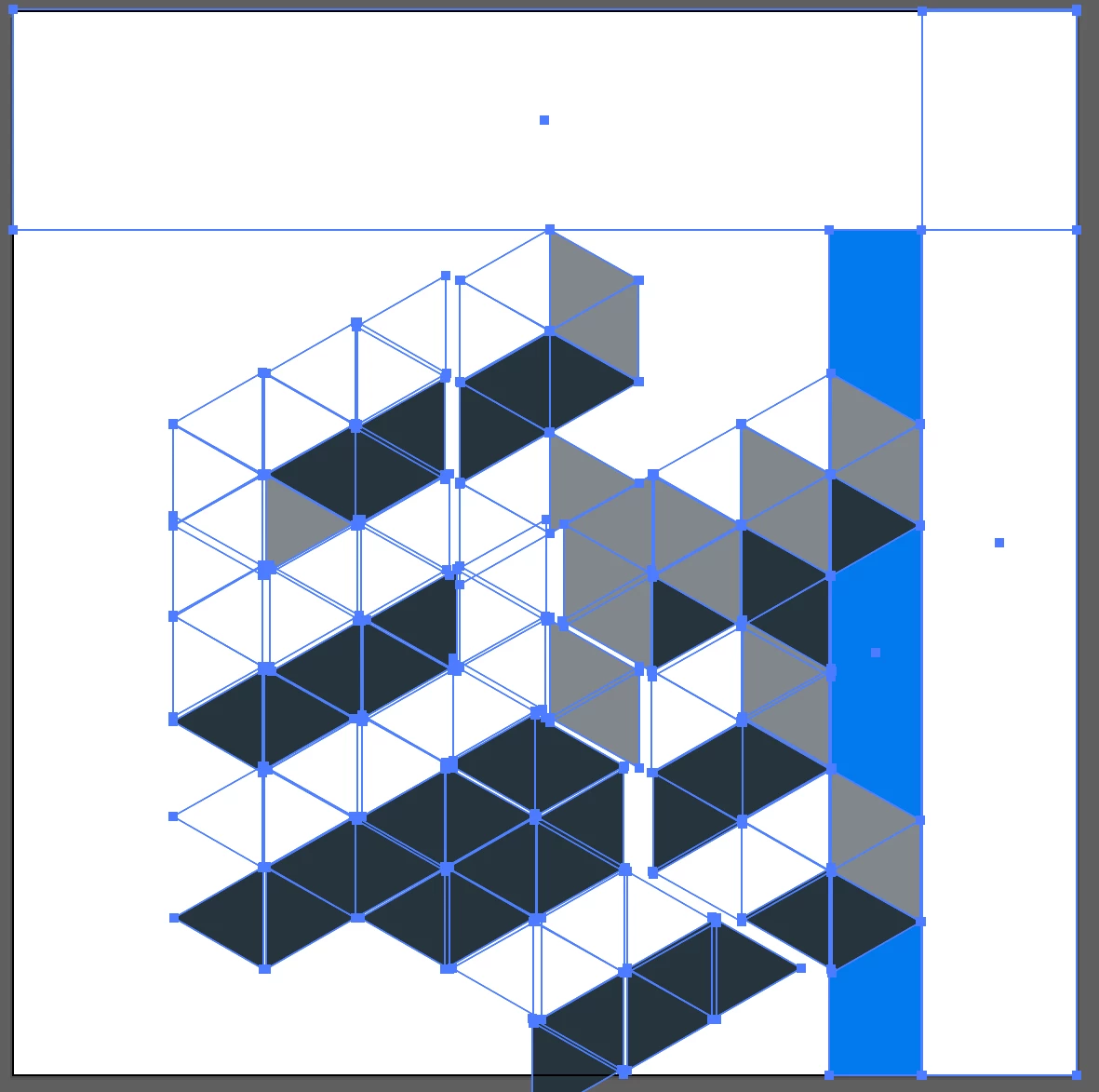
Is there a way to do this more easily than trying to click on each individual triangle to position it?


Thank you for any help!
This topic has been closed for replies.
Correct answer Jeff Witchel, ACI

Try the following:

  1. Draw a hexagon with a Radius of 1" and Rotate it 30°.
  2. Connect each of the opposite corners with a line segment using the Line Segment tool (\). Smart Guides should help in connecting the corners accurately.
  3. With the objects still selected, use Divide in the Pathfinder panel to divide into separate triangles.
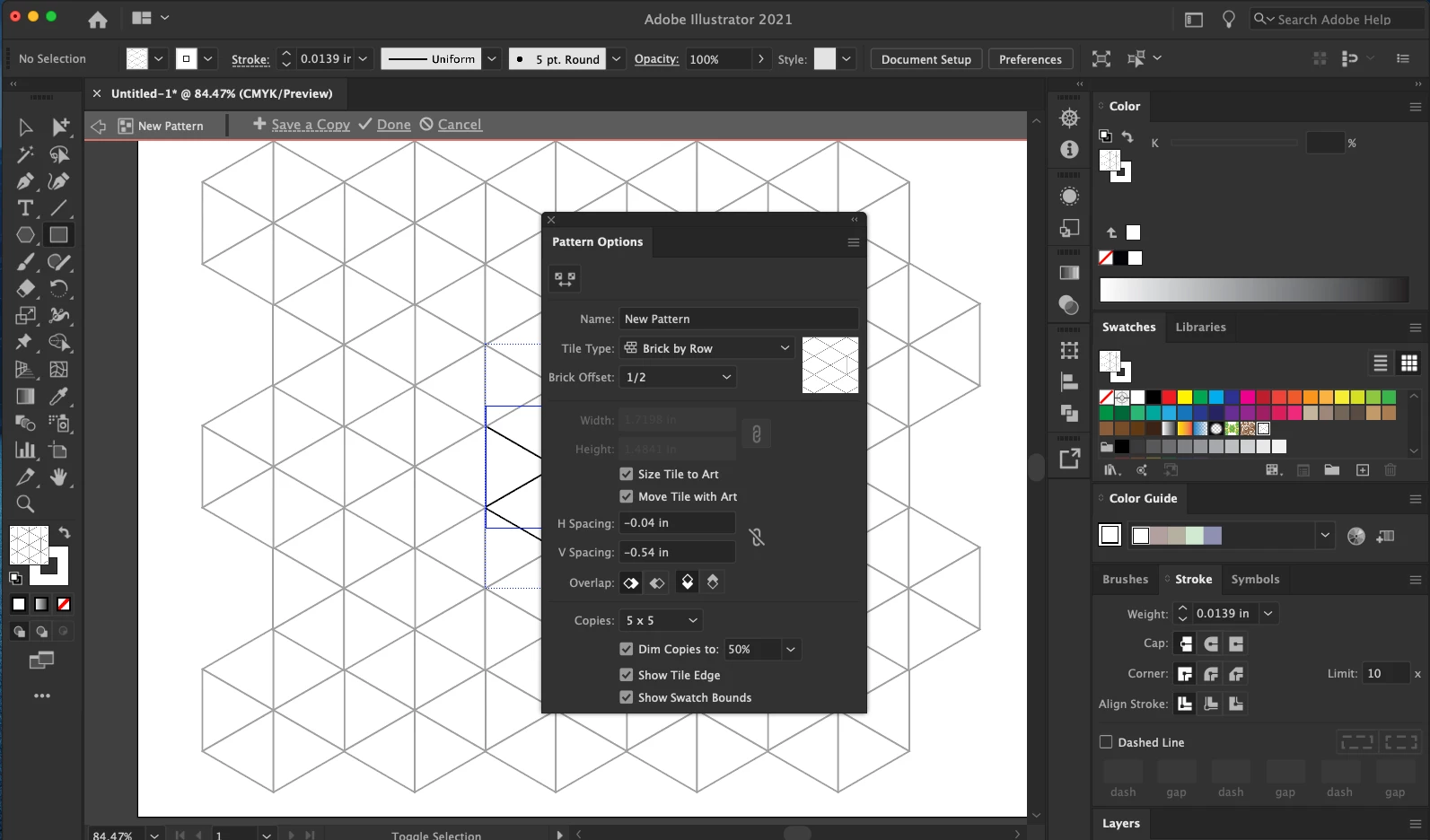
  4. Make the group of triangles into a Pattern using the Pattern Options panel (Window > Pattern Options) using the setting in the screenshot below. You may have to play with the Width and Height numbers a bit.
  5. Save your Pattern and apply it to the Fill of a rectangle that is large enough for the design you wish to create.
  6. With this rectangle selected, go to Object > Expand.

You should be able to fill the individual triangles to create the design.

Hope this helps!

4 replies

kirbydooAuthor
Inspiring
January 3, 2021

Thank you for the answers everyone. I learned some new things in creating this project.

Jeff Witchel, ACI
Community Expert
Jeff Witchel, ACICommunity ExpertCorrect answer
Community Expert
January 2, 2021

Try the following:

  1. Draw a hexagon with a Radius of 1" and Rotate it 30°.
  2. Connect each of the opposite corners with a line segment using the Line Segment tool (\). Smart Guides should help in connecting the corners accurately.
  3. With the objects still selected, use Divide in the Pathfinder panel to divide into separate triangles.
  4. Make the group of triangles into a Pattern using the Pattern Options panel (Window > Pattern Options) using the setting in the screenshot below. You may have to play with the Width and Height numbers a bit.
  5. Save your Pattern and apply it to the Fill of a rectangle that is large enough for the design you wish to create.
  6. With this rectangle selected, go to Object > Expand.

You should be able to fill the individual triangles to create the design.

Hope this helps!

pixxxelschubser
Community Expert
Community Expert
January 1, 2021

Three ways (for the beginning)

  1. hexagonal grid or
  2. long shadow or
  3. 3D extrude


Jacob Bugge
Community Expert
Community Expert
January 1, 2021

kirbydoo,


A simple way is to create lines that go all the way through wherever you have edges, without your worrying about their crossing one another, then use the Shape Builder/Live Paint Group.


https://helpx.adobe.com/illustrator/using/creating-shapes-shape-builder-tool.html
https://helpx.adobe.com/illustrator/atv/cs5-tutorials/creating-complex-art-with-the-shape-builder-tool.html