



XYPN
Participant
January 18, 2021
Answered

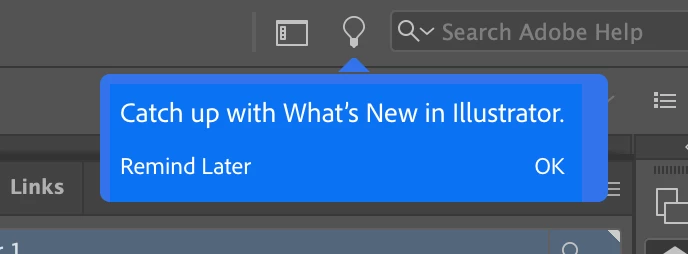
Turn off Illustrator "Catch up with what's new" notification

  • January 18, 2021
  • 26 replies
  • 28626 views

Does anyone know how to turn off this notification for the Learn window in Illustrator? It pops up every single time I open Illustrator, multiple times a day regardless of when I last opened, and it's driving me crazy. It's not useful or interesting, but I can't find anyone that's successfully turned it off. 
 

Correct answer Srishti Bali

Hi all,


We're extremely sorry to hear about this trouble.  I understand how distracting and frustrating it could be. Ideally, it should stop once you close it. We're currently investigating is issue but unfortunately couldn't replicate this behavior at our end. 


We need your help replicating this issue. In case you are still facing this issue, please feeel free to send us a DM. We'd be happy to help.


Regards,

Srishti


26 replies

Participant
May 20, 2021

What I have discovered is (under Illustrator... Preferences...) UNCHECKING the box called 'Enable Content Aware Defaults' will remove all the annoying pop-ups next to the tools when you try to select one and it seems to have pushed that annoying notification, in which no one can get rid of, to the bottom of the screen. It's my best option so far just to get it out of my view.

Participating Frequently
May 20, 2021

Hi AudreyXY,

I have tried everything listed to date and none of them worked. I run the current Illustrator and Photoshop on two machines, a laptop and iMac and it drove me crazy. Unchecking Show Tool Tips didn't help but is part of the solution I found that works on both machines in both programs, at least for the last two weeks.


- Uncheck Auto Show the Home Screen.

- Check Use Legacy "New Document" Interface.


Leaving Show Tools Tips helps "some" but you still get the pop-ups, just not as often. I don't want them at all so I unchecked this.


Hope this helps.

Known Participant
June 26, 2021

Thank God....this seemed to have worked for me.


Adobe needs to stop being so damn intrusive!

Participating Frequently
June 26, 2021

Just a note that ever since I posted this I have not had this issue on either machine or program for over a month.


Hopefully this helps more users but this is not what we should have to do.

Participant
May 5, 2021

How is this marked as solved? This bug still exists. I see it everyday when I start Illustrator. I need to restart Illustrator everday because of some other bug where Illustrator cannot be kept open for more than 8 hours before a lot of things stop working. The amount of bugs a user has to deal with has a significant negavitve impact. On top of that, you mark things as solved when they aren't? 

Participant
April 22, 2021

This is extremely annoying. I have looked everywhere and there is nothing I can do to get rid of it! I do hope Adobe will address the issue soon. There used to be a feature to turn it off - please put it back!

ChristianMala
Known Participant
April 20, 2021

Here you go, this worked for me https://www.youtube.com/watch?v=dHXwYHwBues

ChristianMala
Known Participant
April 20, 2021

For the love of all that is holy, nobody ******* cares about these stupid tutorials. Stop pushing this on us.

Participant
April 20, 2021

This has been happening to me, too. It's very annoying. And it seems to only have started with the 2021 version of the app.

Srishti Bali
Community Manager
Srishti BaliCommunity ManagerCorrect answer
Community Manager
March 24, 2021

Hi all,


We're extremely sorry to hear about this trouble.  I understand how distracting and frustrating it could be. Ideally, it should stop once you close it. We're currently investigating is issue but unfortunately couldn't replicate this behavior at our end. 


We need your help replicating this issue. In case you are still facing this issue, please feeel free to send us a DM. We'd be happy to help.


Regards,

Srishti


Participant
April 8, 2021

Has there been an solution to this already? 

This is just REALLY annoying...  


I'm on a macbook pro 2018 / big sur 

2,2 GHz 6-Core Intel Core i7

32 GB 2400 MHz DDR4

Radeon Pro 555X 4 GB

Intel UHD Graphics 630 1536 MB

Participating Frequently
March 1, 2021

how can i turn off the icon top right that says Catch Up With What's new in Illustrator?

Ashutosh_Mishra
Inspiring
March 6, 2021

Hi Kathleen,


Sorry to hear about this. This tour window should not come up once the tour is completed. Did you click on "Remind me later" & it appeared after relaunch? Please share version of OS as well.


This information would help us assist you accordingly. Looking forward to your response.


Regards,

Ashutosh

Participant
April 22, 2021

My OS is MacOS 11.2.3. I can't find a way to turn it off anywhere. It's the most annoying thing, next to the 'tool pop-out' showing me how to use it. I'd like to get rid of that too! Please help.

freew111
Inspiring
March 1, 2021

How to turn off this annoying tooltip "Get started with fun" once and forever?


Any advice? Thanks!

italosan
Community Expert
Community Expert
March 1, 2021

Hi, you can turn off Tool Tips by going to Illustrator Preferences > Uncheck Show Tool Tips.

freew111
Inspiring
March 3, 2021

That'd be my first thought too, but unfortunately doesn't help. Still receiving this even though the option is unchecked.
