
Inspiring
July 18, 2022
Answered

Turning off Save to Cloud as default

  • July 18, 2022
  • 7 replies
  • 22102 views

I never want to have my machine save to the cloud. I have small-town sucky internet and saving to the cloud makes that significantly worse. 


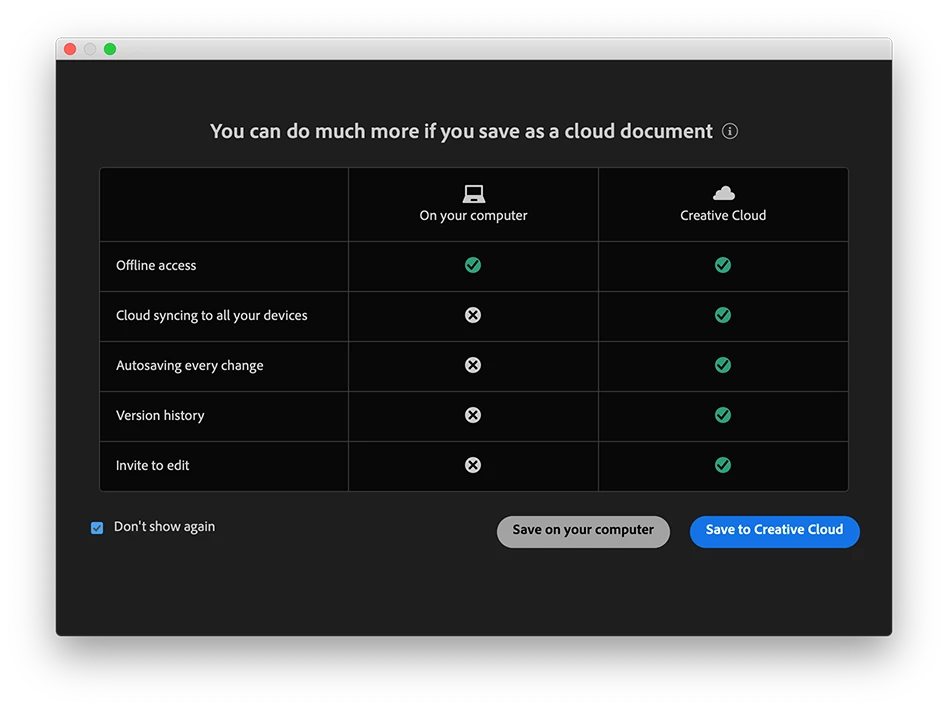
But I don't see a way to get it to default to not saving to the web. I mean there is a button to not ever be asked again but the last time I tried that on an Adobe product it took that to mean that it should ignore the fact that I asked for it to be save locally that time (and every other time) and in addition to never asking again it should just save it to the cloud. 


I see a way to set this in Photoshop, but do not in Illustrator. I'd really like to not be constantly have Adobe apps trying to get me to save to the Cloud.

Note - Adobe also seems to reset to defaulting to the cloud everytime I update my programs.
Update to Photoshop - You must have also wanted to start saving to the web. WTF Adobe?
What is with that? Trust that if your customers don't want to use that feature they might have a reason. The last time it did that I was trying to save a 5gb temporary file that I was going to be flattening shortly, I forgot I had recently updated and I clicked just a bit too fast and Adobe saved to the Cloud. The whole mess destroyed my internet connection for a few days because once Adobe started it seemed to get stuck even after the process was cancelled and the file deleted. It didn't just mess up my internet either it also dragged it down for my entire househould. I'd really appreciate it if Adobe stopped changing peoples settings on updates.
Correct answer Ton Frederiks

I have seen this appear and after I click "Don't show again" and click Save on your computer, that becomes the default.

But Anubhav answer seems better.

7 replies

Egor Chistyakov
Inspiring
September 4, 2025

I don’t see the option in UI.

We can toggle it manually by setting the /AdobeSaveAsCloudDocumentPreference flag to zero in Adobe Illustrator Prefs, or running this script code:

app.preferences.setBooleanPreference ("AdobeSaveAsCloudDocumentPreference",false);


But I treat it as Ai actively trying to lock users in their choise, accidental or not. I hate it.

Here’s a bug report and I ask those who feel the same upote it.

Ton Frederiks
Community Expert
Community Expert
September 4, 2025

Totally agree, Egor. Voted!

AJMrly
Participating Frequently
June 22, 2023

After clicking "Do Not Ask Again" it now defaults to cloud save by default, even though I selected Save to my computer when selecting do not ask again. This is so dumb, Adobe, and the option in File Handling to turn off cloud save doesn't exist any more. What if we use a different cloud provider for work? There are 9 million reasons why we should be able to opt out of saving our files to Creative Cloud, not least of which is that for some businesses we're legally not allowed to use third party services to store business-related files. Having this as the default option prevents a risk for those customers and is indefensibly stupid. Listen to your customers! If you want the cloud to do something useful, maybe it could sync/save my workspace arrangements so they don't get erased with every update? That would actually be helpful! I'm on version 27.5.

Monika Gause
Community Expert
Community Expert
June 22, 2023

You might want to make a bug report or to contact Customer Care, so they can login to your computer and set it up:

https://illustrator.uservoice.com

https://helpx.adobe.com/contact.html

Participant
January 24, 2023

What happens when you set your preferences settings to save to your computer and nothing happens??????


Monika Gause
Community Expert
Community Expert
January 24, 2023
quote

What happens when you set your preferences settings to save to your computer and nothing happens??????


By @Greg28089151y43o


Please tell us your version number and system and also what you mean by "nothing happens"

Participant
January 24, 2023

Thanks to Anubhav Majumder for posting the solution to this. I have used Adobe products since the 1980s. I HATE this. It makes me livid. OK Adobe offers the option to opt out and disable cloud saving, but THE OPT OUT DID NOT WORK! It's infuriating to choose to bypass the cloud save option and then have it reappear with the opt-out no longer showing. Sorry to rant but this rubs me the wrong way on so many levels. Over the years I have had projects affected when Adobe pulled fonts from the CC package (will never rely on Adobe fonts again) and recently we have all seen PMS color options crippled. Several years back I even made the mistake of selling clients on projects that used the Adobe Digital Publishing Solution, only to have it yanked away only days after speaking with an Adobe rep about its future. Decisions like these on Adobe's part are not only annoying. They cost us time and money and make me wish there were alternatives. Many of us were once Quark XPress users but invested in InDesign because Quark was difficult to deal with as a company. Adobe is on the same path, IMO. So, my outreach to Adobe here is "Please. Respect your customers' time and loyalty." Understand that professionals are not happy when they are railroaded into a new revenue stream. 


Again, apologies to the community but this makes me furious.

Participant
September 1, 2022

Agreed.

This "solution" doesn't work for people working with large files, sensitive files, or in areas with poor internet service.

Adobe: we already buy the yearly subscriptions. Trying to get us to commit to plans for ever-expanding storage on servers, is frankly insulting. Most of us have giant servers or SSDs to work on.

Concentrate on the product, not the cloud. Rebuild customer trust.

Ton Frederiks
Community Expert
Ton FrederiksCommunity ExpertCorrect answer
Community Expert
July 18, 2022

I have seen this appear and after I click "Don't show again" and click Save on your computer, that becomes the default.

But Anubhav answer seems better.

Digital-MAuthor
Inspiring
July 18, 2022

When I did that with Photoshop checking"Don't show again" and clicking on "Save on your computer" it save the file to my computer as I asked and then set the default to Always Save to Cloud. I'm not sure it will do that with Illustrator, but lets just say I have trust issues with Adobe products at this time.


Community Manager
July 18, 2022

Hello @Digital-M,


Thanks for reaching. I would request you to change the default file location from File Handling under Illustrator's preferences and check if it helps.


Looking forward to your response.


Thanks,

Anubhav


Digital-MAuthor
Inspiring
July 18, 2022
The only setting under File Handling that I see for this changes how often
it saves to the web. I did unclick this. But it still tries to get me to
save all new documents to the web.