Participant
June 16, 2017
Answered

Two dash marks at the corners of my picture when saved in .pdf

  • June 16, 2017
  • 1 reply
  • 423 views

Beginner AI user who just created a gorgeous Wedding Banner.  I placed a picture within the banner and softened the edges around the picture.  It looks PERFECT on the screen and when I saved it in .AI     However, when I save it in .PDF and open it, there are those two dash marks at each corner of the picture.  I don't know why or how to get rid of them.
    This topic has been closed for replies.
    Correct answer Bill Silbert

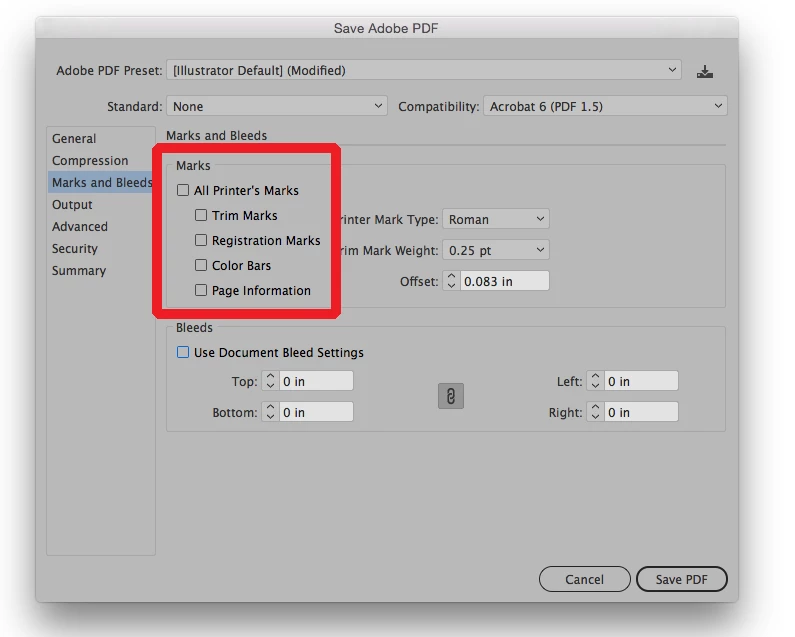
    It sounds like you may have made you pdf with crop marks set. Crop marks are used to show where a printed piece is to be cut. To output your pdf without the crop marks make sure that the Marks and Bleeds section of the Save Adobe pdf dialog box is set up as in the screen shot below:

    1 reply

    Bill Silbert
    Community Expert
    Bill SilbertCommunity ExpertCorrect answer
    Community Expert
    June 16, 2017

    It sounds like you may have made you pdf with crop marks set. Crop marks are used to show where a printed piece is to be cut. To output your pdf without the crop marks make sure that the Marks and Bleeds section of the Save Adobe pdf dialog box is set up as in the screen shot below: