
Known Participant
January 25, 2019
Question

two strokes in one line but not centered!

  • January 25, 2019
  • 7 replies
  • 2072 views

Hi, i wish to create two strokes of different thickness, in one line, BUT not centred with each other. Something like in the pic im attaching. Is this possible?

(please keep in mind that im not talking about creating -via the appearance tab- 2 strokes that are centred in one line)
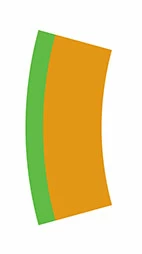
This topic has been closed for replies.

7 replies

pixxxelschubser
Community Expert
Community Expert
February 1, 2019

genik  schrieb

Hi, i wish to create two strokes of different thickness, in one line, BUT not centred with each other. Something like in the pic im attaching. Is this possible?

(please keep in mind that im not talking about creating -via the appearance tab- 2 strokes that are centred in one line)

May be possible with a 'hard gradient'

pixxxelschubser
Community Expert
Community Expert
February 17, 2019

genik​,

there are two questions in this thread.

Was one of them (or both) solved? Or do you need further assistance?

genikAuthor
Known Participant
January 26, 2019

I try to make a graphic style out of the element i have attached but it doesn't seem to allow it! Could it be the design's way of structure that is the problem?

Ton Frederiks
Community Expert
Community Expert
January 26, 2019

A graphic style is a set of reusable appearance attributes.

Did you read the documentation about the creation of  graphic styles?

Work with graphic styles in Illustrator

genikAuthor
Known Participant
January 25, 2019

I cannot locate the Width Point Edit dialogue box... is that feature available on CC 2017?

Ton Frederiks
Community Expert
Community Expert
January 25, 2019

Double Click the start anchor point of a line with the Width Tool and do the same for the end point.

How to apply strokes in Illustrator

Jeff Witchel, ACI
Community Expert
Community Expert
January 25, 2019

Both the Art Brush and Width Profile methods work well.

If you decide to go the Width Profile approach, make sure to save a Graphic Style so you can apply it quickly and consistently. You could save different Graphic Styles for a variety of color combinations.

You can change the colors of Art Brushes as well. In the Art Brush dialog, choose Hue Shift. See screenshot below.

If you change the color of the Stroke of the path the Art Brush is applied to, the color of the Art Brush will change as well.

Ton Frederiks
Community Expert
Community Expert
January 25, 2019

The problem with the Art brush approach is that the widths of the strokes are fixed and you can only recolor one of the strokes.

The Width approach lets you modify both stroke parts in size as well as color.

Adding Graphic Style(s) is a good idea as well as saving the stroke Variable Width profile.

Jeff Witchel, ACI
Community Expert
Community Expert
January 25, 2019

If you change the Weight of the Stroke, the Art Brush thickness will change along with it. So it you change the Stroke Weight to 2 pt from the default 1 pt, the Width of the Art Brush will double.

Ton Frederiks
Community Expert
Community Expert
January 25, 2019

How about 2 strokes in the Appearance panel where the underlying stroke has a a different Width profile.

genikAuthor
Known Participant
January 25, 2019

I think thats it! Strange though because i tried to do this, on the appearance tab, but with different result.

In my try, when i would make the underlying stroke thicker than the overlying stroke, it would appear to overfill both sides of the top stroke. How did u achieve this? How does the Width Point Edit window appear?

Ton Frederiks
Community Expert
Community Expert
January 25, 2019

genik  wrote

I think thats it! Strange though because i tried to do this, on the appearance tab, but with different result.

In my try, when i would make the underlying stroke thicker than the overlying stroke, it would appear to overfill both sides of the top stroke. How did u achieve this? How does the Width Point Edit window appear?

In the screendump above, where Side 1 of the width point is 3 and the bottom is 1 it will start showing on the other side when the stroke is enlarged.

But if you start with a 4 pt stroke and make side1: 4 and the other side 0 it will not happen.

genikAuthor
Known Participant
January 25, 2019

Thanks, but i wish to apply this setting and make stroke changes on any object that i wish to apply the stroke to.

John Mensinger
Community Expert
Community Expert
January 25, 2019

genik  wrote

Thanks, but i wish to apply this setting and make stroke changes on any object that i wish to apply the stroke to.

Yes, you could do that with an Art Brush, of course. Once its made, you can apply it to any stroke.

How did u achieve this? How does the Width Point Edit window appear?

You'll have to use the Width tool on the underlying stroke's endpoints. Then, you can adjust the stroke's width from one side at a time by holding Alt before you click/drag, or as in Ton's example, call up the Width Point Edit dialog by double-clicking a width adjustment point...

Kurt Gold
Community Expert
Community Expert
January 25, 2019

How about creating an Art brush (see Brushes palette) that consists of two rectangles (filled or stroked)?