MahaB82A
Legend
October 23, 2024
Answered

Type in Appearance Panel

  • October 23, 2024
  • 1 reply
  • 3207 views

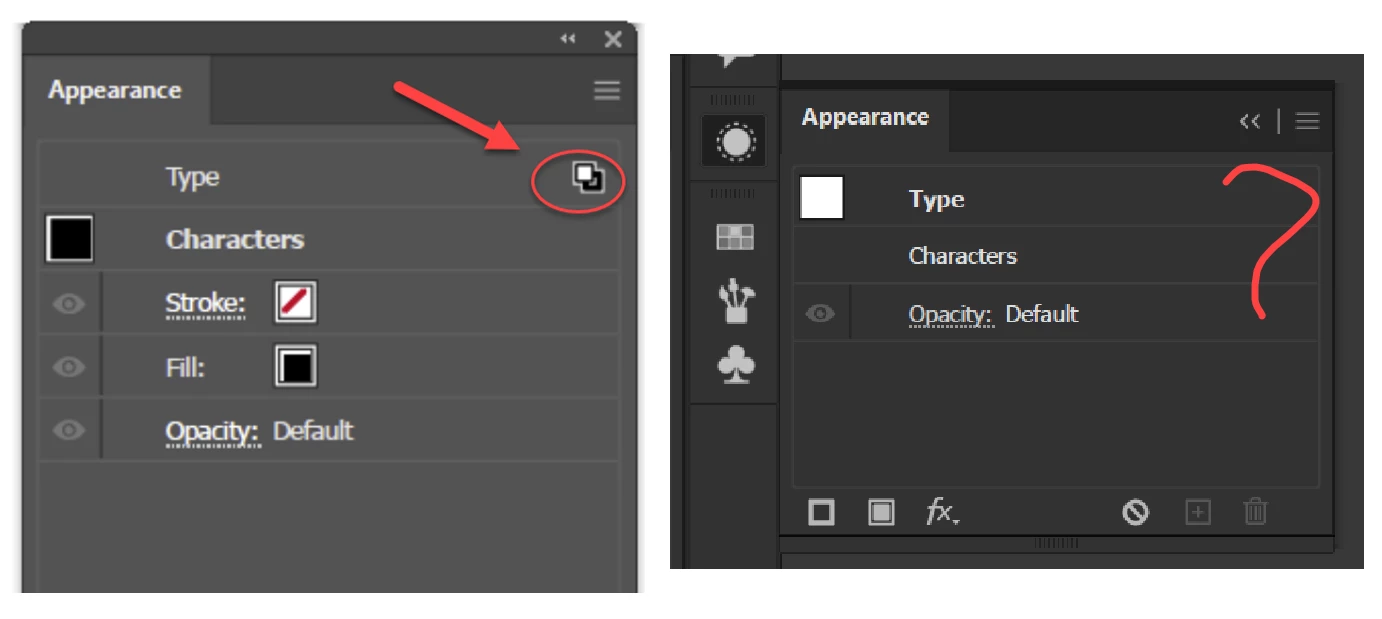
I have confusion over this. When is this TYPE icon appearing?
 

Correct answer Doug A Roberts

It does not come. Video is attached.


That's because there is no appearance applied at Object level. Do the following:


1. Select the type with a selection arrow.

2. Apply a fill in the appearance panel.

3. Double-click on 'Characters' or select the type object with the Type tool.

1 reply

Monika Gause
Community Expert
Community Expert
October 23, 2024

This can happen where there has been an appearance, but it has not been cleared fully.


Just click on "Clear appearance" with the text object selected to get rid of it. In order to figure it out, I would need the AI file.

MahaB82A
MahaB82AAuthor
Legend
October 23, 2024

What have I to do to make this icon visible?

Doug A Roberts
Community Expert
Community Expert
October 23, 2024

Apply a stroke or fill to the type object at Object level, then switch to Character level.

Your first screenshot has the Character appearance shown. Your second has Type (the Object level) appearance shown.


Example:

1. Type object is selected with the Type tool. Character level appearance is shown. There are stroke/fill and effect icons next to 'Type' to indicate that there is a stroke or fill and effects applied at Object level:

2. Object level appearance (double-click on 'Type' in previous screenshot or select with a selection arrow). There is a blue fill and Transform effect applied:

3. Type object selected with type tool. There are no appearences applied at object level - 'Type: No appearance' is there to indicate this:
