
Participating Frequently
July 10, 2024
Answered

Ugly edges while trying to combine two differently colored objects

  • July 10, 2024
  • 2 replies
  • 1801 views

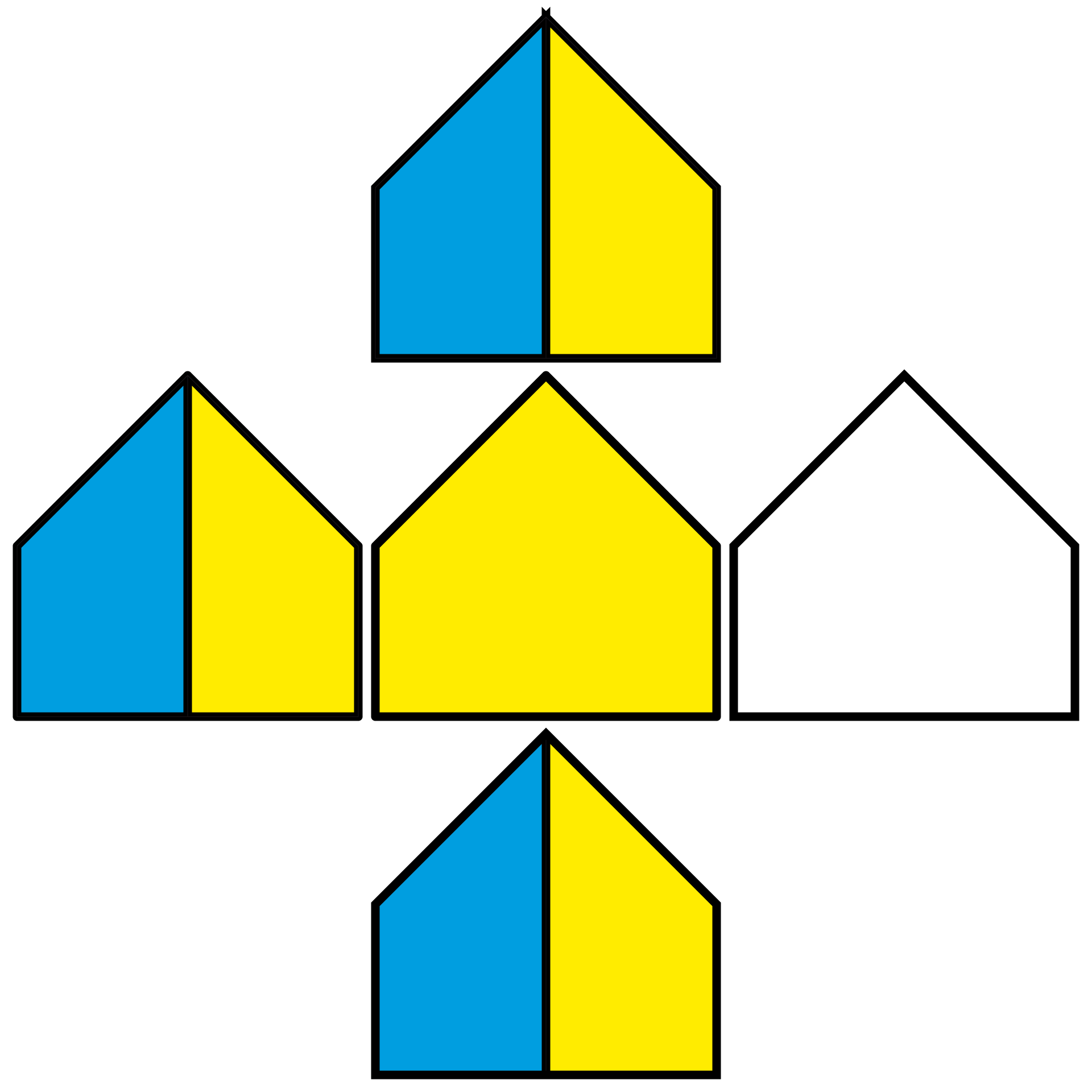
Below is the object I want to create, but when I try to combine both objects, ugly triangles appear above it. How can I combine both objects without changing their colors? If I use the shape builder tool, only one color shows up. I want to keep both colors, yellow and blue. Please help me. Your help is appreciated.
This topic has been closed for replies.
Correct answer Jacob Bugge

Ankith,


In case you can use a multiple path solution, here is a more straightforward 2 path solution often suggested and covering many cases sometimes with different specific steps, the relevant steps here shown separately and both paths together below:


A) Change the Butt Cap/Miter Join stroke to Round Cap/Round Join for both paths;

B) Create a copy of the set on top, then Pathfinder>Unite to change the set to a single path (now with one of the colours, corresponding to what you have found when trying different ways);

C) Remove the fill and change the Round Cap/Round Join stroke back to Butt Cap/Miter Join;

D) Group the 2 paths.


Click to get closer, Click again to get closer still

2 replies

Jacob Bugge
Community Expert
Community Expert
July 10, 2024

Ankith,


Below are two versions of an ugly edge 1 path solution, each in the form of a single path with fill and stroke, and working with sharp corners (Miter Joins).


They may be seen as seriously silly.


Hint: the second one is an elaboration on an ancient solution, once necessary for a certain task.


Click to get closer, Click again to get closer still

Participating Frequently
July 11, 2024

Hi Jacob,


Can you please help me with the steps? Your help is appreciated.


Thank you,

Ankith Rudra

Jacob Bugge
Community Expert
Community Expert
July 11, 2024

Ankith,


Seriously delayed by urgent issues, here are the two sets of 1 path solution steps, with the ugly original at the top, both with fill and stroke; in both cases each half is 300pt x 600pt (total width 600pt) and a stroke of 15pt aligned to centre:


1) consists of a closed path with 5 or 6 Anchor Points, the latter when the single path is made with Pathfinder>Unite giving one Anchor Point in the middle of the bottom, and with a horizontal gradient C/K/Y that is sharp with 6 gradient sliders C+C/K+K/Y+Y, the sets C/K and K/Y coinciding, thereby painting the vertical black part in the middle instead of a stroked path; the C/K at 48.75% and the C/K at 51.25%; the fill and stroke are shown together and separately below.


2) consists of an open path with 8 Anchor Points, the single path made with Pathfinder>Unite giving one Anchor Point in the middle of the bottom, with:

2a) A horizontal gradient C/Y that is sharp with 4 gradient sliders C+C/Y+Y, the set C/Y coinciding at 50%, and the actual path, visible by the stroke starting at the middle of the bottom and going clockwise all the way round the outer bounds and then up the middle to end at the very top; the fill and stroke are shown together and separately below.


2) has a much simpler gradient with no need for calculation, and since it is made with Pathfinder>Unite, it can be cut at the Anchor Point in the middle of the bottom thereby opening the path, and then the new vertical segment in the middle is made with the Pen Tool by simply first Clicking the (topmost) end Achor Point at the bottom followed by ClickHolding close to the very top and then holding the Spacebar and snapping to the very top Anchor Point, Smart Guides being your friends.


Click to get closer, Click again to get closer still

Monika Gause
Community Expert
Community Expert
July 10, 2024

I'm covering techniques in this tutorial https://youtu.be/0OUwr_GFwkA 

Participating Frequently
July 10, 2024

This video does not show how the two objects can be of different color if we use pentool.

Monika Gause
Community Expert
Community Expert
July 10, 2024

Two colors are only possible by using two shapes. 


Please show the complete object.

Please describe your needs. Does this need to be editable, do you need this for dozens of the same shapes? Do you need this as a graphic style? ...