


Inspiring
Jan 15, 2025 10:47 AM UTC
Question

Un-close pasted path

I've got a pattern of abstract paths in Photoshop that I've pasted into Illustrator. So far so good. However, both programs have a habit of automatically closing shapes.

 In Illustrator, the shape (see bleow) is automatically closed (whereas the left hand side should be open).

In order to fix this I'm currently having to locate each shape, direct selection of each point, cut it, paste it in place and then re-apply stroke to it. Like the shape as I want it!
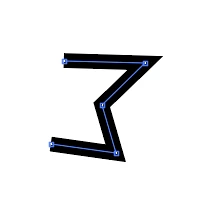
This process is fine for a couple, but really rather long winded for hundreds of shapes. 

Is there an easy/faster/better/cheaper way of solving this? What have I missed?


As always, answers on a postcard...


9 replies

Kurt Gold
Community Expert
Community Expert
Jan 15, 2025 8:00 PM UTC

Based on your screenshot it looks as if your closed path is an appearance (possibly a pathfinder effect at the layer level) or a compound shape.


To verify that, you could share a sample Illustrator file with the object shown in your screenshot.

Translate
Inspiring
Jan 16, 2025 2:27 PM UTC

There's an idea. Here's a very minimal copy of the file with just the open and closed versions. 


Translate
Monika Gause
Community Expert
Community Expert
Jan 16, 2025 2:35 PM UTC

If you want to share a file, please use the forum's web interface. Change the file extension to .pdf.

Translate
Monika Gause
Community Expert
Community Expert
Jan 15, 2025 11:39 AM UTC

How do these shapes exist in your Photoshop file? Are they shape layers? Just paths in the Paths panel?

Translate
Inspiring
Jan 15, 2025 2:19 PM UTC

Just a vaniall paths from path panel. Not a shape or a Shape in the path panel.

Translate
Monika Gause
Community Expert
Community Expert
Jan 15, 2025 2:40 PM UTC

I have just tried pasting multiple open paths from Photoshop into Illustrator and didn't have issues. They stayed open.

Translate