

Ethereal_enthusiasm5C11
Participant
October 19, 2024
Question

Unable to change colours of objects in Illustrator
  • October 19, 2024
  • 2 replies
  • 225 views

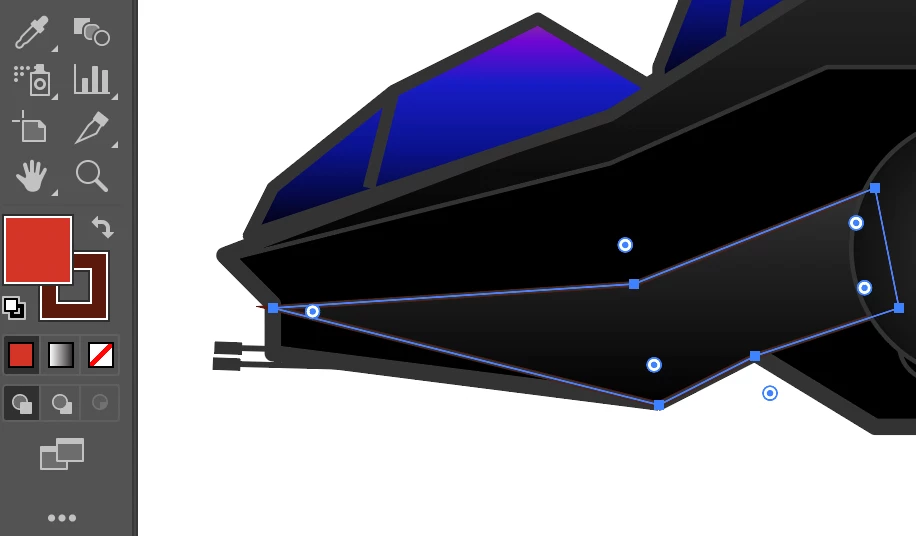
As you can see, here's one example of one object I'm unable to change to colour. 

I've changed the color options from "grayscale" to "CMYK", to choose what colors I want but when I select the desired color nothing happens.
I've selected the object and expand, and still nothing happens.

I've reset the settings to default and redo the above steps but nothing happens.

Anyone have this issue before?

This topic has been closed for replies.

2 replies

Monika Gause
Community Expert
Community Expert
October 19, 2024

When you open the color panel and show its options, what do you see?

Mike_Gondek10189183
Community Expert
Community Expert
October 19, 2024

There are many reasons, but you can narrow them down if you select the item, and show the appearance palette


  • The item might have transparency set to multiply.
  • You may have a fill at the group level or even layer level set to black.


Copy and paste it to the side, does the red show?