



Jacqueline209
Participant
April 17, 2026
Question

Unable to click-drag objects in Illustrator 30.3 on Windows

  • April 17, 2026
  • 4 replies
  • 86 views

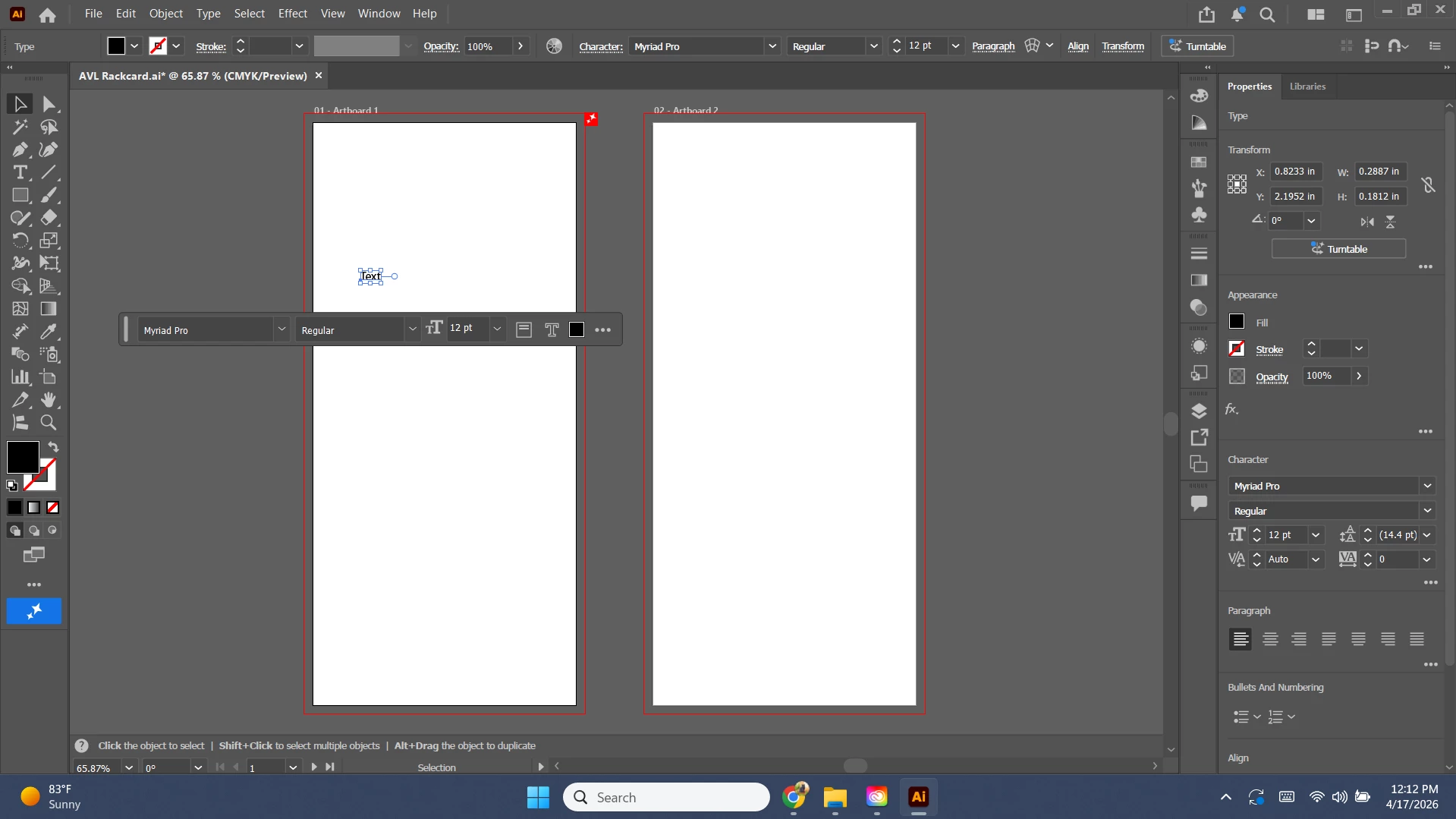
I am using Illustrator 30.3. When I open my file it lets me edit and move text and images for about 3 minutes and then it just stops letting me. After that happens, I can only move texts and images using the transform window. As soon as I click using the type button it lays the font down immediatly and doesnt let me click and scroll to change size.


Not sure how to capture an image of this but ill just add one. 


This is awful. Please help me. 
 

4 replies

GHans
Participant
April 21, 2026

Pleaser fix quickly!

Anubhav M
Community Manager
Community Manager
April 22, 2026

Hello ​@GHans 


I’m sorry to hear about your experience. Would you mind confirming the version of the OS/Illustrator installed, and confirming if this started happening after a recent hardware/software change, so we can better assist you?

 Also, try running Illustrator after rebooting your computer in Safe Mode (Windows / macOS) and checking if it helps.
 

Looking forward to hearing from you.
Anubhav

GHans
Participant
April 21, 2026

This is happening to me as well. Tried all things said and stops working after a few minutes.

Bill Silbert
Community Expert
Community Expert
April 20, 2026

Just to eliminate program-wide corruption it might be a good idea to try resetting your Illustrator preferences. Corrupt preferences can lead to erratic behavior. Resetting the preferences will restore the program to its defaults. Hopefully, this process will provide some relief.

To reset preferences on Windows:

You can try the quick way of resetting on a PC which is to hold down Ctrl + Alt + Shift when launching Illustrator and respond affirmatively when asked if you want to reset. There have been some recent reports that the window asking if you want to reset is not popping up but that the prefs are being reset anyway. If this works great but if it doesn’t you may have to manually delete them.

To do so:

On Windows 7 and above the preference files are hidden. To find them go to the Control Panel and open Folder Options and then click the View tab. Then select “Show hidden files and folders” or “Show hidden files, folders or drive options” in Advanced Settings. Then delete (or rename) the folder at the end of this path: C:\Users\[User Name]\AppData\Roaming\Adobe\Adobe Illustrator [version number]\ Settings\<Language>. Make sure that Illustrator is closed when you do this. When you relaunch the program it will create  new preference files and the program will be at its default settings.

The advantage of manually deleting preference files is that after you’ve reset up the program (make sure that no document window is open) to your liking, you can create copies of your personalized “mint” preference files (make sure that you quit the program before copying them—that finalizes your customization) and use them in the future to replace any corrupt versions you may need to delete.

Community Expert
April 17, 2026

This issue could be caused by a number of different things, including a possible bug in Illustrator. Is the problem happening only in Adobe Illustrator? Are there other applications running at the same time?


For basic troubleshooting measures I'd try rebooting the computer and also checking the connections of the mouse or graphics tablet being used. A bad USB cable or dying battery in a wireless setup can cause issues. If the mouse/tablet is plugged into a USB hub try plugging it into a port on the computer itself.

Jacqueline209
Participant
April 17, 2026

No other applications are running at the same time, just google chrome opened.

I have restarted my laptop multiple times.

My mouse lets me click, it just doesnt let me drag or move things.

I opened indesign and it basically is doing the same thing (not letting me drag items after around 2-3 minutes of the program being opened). 

Anubhav M
Community Manager
Community Manager
April 17, 2026

Hello ​@Jacqueline209 


I’m sorry to hear about your experience. Would you mind trying to run Illustrator after rebooting your computer in Safe Mode with Networking (Windows) and checking if it helps?

Also, try using a different mouse/pointing device and share your observations.


Looking forward to hearing from you.
Anubhav