
Inspiring
October 3, 2019
Answered

Unable to find handles while typing on path in Illustrator.

  • October 3, 2019
  • 4 replies
  • 10432 views

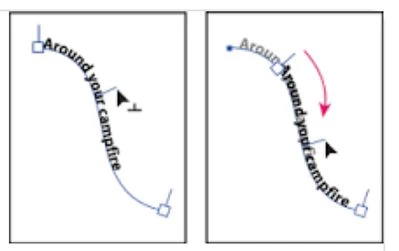
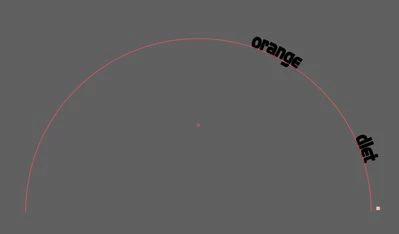
The first photo is what it used to look like when I wanted to move type along a path. But today I don't see the handle/center bracket that allows me to move type on a path. Can someone please tell me where my handle/center bracket has gone or how to get it back?


{Merged and renamed by MOD}

Correct answer LPerk

Make sure that "Show Edges" is enabled.

Go to View and scroll down the list. If you see "Show Edges" that means it is disabled. Select that and it should turn them on.

Or, the key command on a mac is "Command H" 

4 replies

Participating Frequently
May 1, 2023

iv ejust posted on a thread where windows and panels are disrupted after mac falls alseep - seems like tool settings are also disrupted

LPerk
LPerkCorrect answer
Participant
September 24, 2020

Make sure that "Show Edges" is enabled.

Go to View and scroll down the list. If you see "Show Edges" that means it is disabled. Select that and it should turn them on.

Or, the key command on a mac is "Command H" 

Vadio
Participant
December 14, 2020

You saved me. I have been looking for this over 30min. Thanks a lot. 

Rishabh_Tiwari
Community Manager
Community Manager
October 3, 2019

Hi there,


Hi there, thanks for reaching out. If I get it, you are unable to get the handles that allows you to move the words you typed.

I would request if you can share a few more details like:


  1. Version of OS and Illustrator.
  2. Do you see the same beahviour on the new files ?
  3. Please check in the Layers Pannel if the layers are locked, if yes, please unlock them and try again.


Please refer to this helpful tutorial for Type On Path tool.

https://www.youtube.com/watch?v=ZW1l9yGXFgU


Let us know if that helps or you need any further assistance.


Regards

Rishabh

Inspiring
October 3, 2019

The first photo is what it used to look like when I wanted to move type along a path. But today I don't see the handle/center bracket that allows me to move type on a path. Can someone please tell me where my handle/center bracket has gone or how to get it back?

Monika Gause
Community Expert
Community Expert
October 3, 2019

You need to select the text object with the selection tool (black arrow).