



Anna Šmejkalová
Known Participant
September 15, 2025
Answered

Unable to launch Illustrator on macOS Tahoe

  • September 15, 2025
  • 71 replies
  • 13496 views

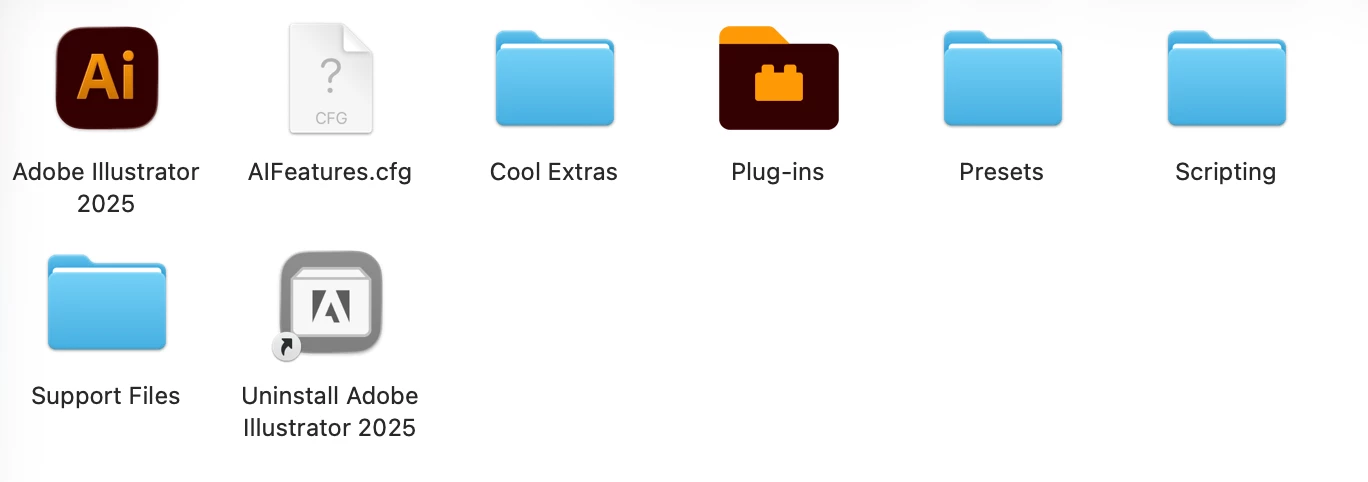
Hi, I've just updated to MacOs Tahoe 26. MacBook Air M2. I can't launch Illustrator. Reinstalling the app from Creative Cloud didn't work 😕😕 There's clearly some problem (the question mark thing). What can I do please? Thank you so much! 🙂
Correct answer ElevatedRoast

After days of waiting 10-15 mins for Illustrator to launch within Mac OS Tahoe, I uninstalled / reinstalled / tried earlier version, but the solution that worked was installinf the Wacom driver for Tahoe.  Thank you, everyone for getting together on this.

https://www.wacom.com/en-us/support/product-support/drivers

71 replies

Participant
September 28, 2026

I've been having an issue with both After Effects and Illustrator on macOS Tahoe 26.6.2 (MacBook Pro, M5 Pro, 48GB RAM). Both applications crash just a few seconds after launching, leaving me with no option but to force quit them (I can't even choose to start on Safe Mode on After Effects). I was using both apps earlier this year on the same computer without any issues or performance problems. However, for approximately the past two weeks, I've been unable to use either application or open a project. Photoshop and Premiere Pro are working normally, although Premiere Pro did experience a few glitches recently that eventually stopped on their own. I've already tried installing previous versions of both apps, Illustrator 29.8.1 and After Effects 25.6.5, but they still crash shortly after launching. I also had Wacom software installed, so I completely uninstalled and removed all related files and components to rule out any possible conflicts, but the issue still persists. As an additional test, I installed After Effects 2026 on a Windows PC, and it launched and worked normally. I don't know if the issue could be related specifically to macOS Tahoe or to something on my Mac that is causing both applications to crash.Please help! 


Anubhav M
Community Manager
Community Manager
September 28, 2026

Hello ​@Anapau 


I understand how frustrating it can be to encounter crashes in the middle of work. Would you mind trying the suggestions in this help article (https://helpx.adobe.com/illustrator/kb/fix-crash-on-launch-issues.html) and seeing if they help?

Also, kindly submit the crash report using your Adobe email address and share it here for quick tracking. Steps are shared here: (https://helpx.adobe.com/illustrator/kb/crash-next-steps.html). We appreciate your time and patience in helping us resolve this issue.

Anubhav

StevenPorter
Participant
May 8, 2026

I’ve got an Intuos Pro M PTH 651 and was not able to launch Illustrator or configure the tablet using the current driver (6.4.10-3). I removed it and installed the previous version (6.4.9-2) and now I everything works.
 

Participant
November 17, 2025

I don't have a wacom driver to install or uninstall, but Illustrator is just giving me this, and I have done everything they say with 'Permissions'  - same thing over and over...any ideas?


Participant
November 11, 2025

Worked for me!

RC-Powerbus-v2
Participant
October 20, 2025

Had a frozen MacMini M4, new and frashly installed with the needed software apps, read some of the comments. Trial and error: Checked transparencies in System ≥ Access ≥  Screen ≥ engage 'Deminish transparancy'. (Translation on the fly, work in another language)
Seemed to work!

Participant
September 29, 2025

After I happily resolved my driver problem that stalled Illustrator, I learned something worse.


The Wacom drivers for Mac OS Tahoe do not support the Intuous PTH-651 tablet that I use.  Wacom support confirmed that I had to return to OS 15.x or buy a new Wacom 2025 edition -- it became my 3rd forced obsolete tablet, the other two were obsolete because cable input changed.  
Despite my feelings about Wacom in this, I bit the bullet and went with XENCELABS and could not be happier. It was 35% less, twice the resolution, comes with so much more than Wacom.  Even the tablet surface has more natural grit to it than the mirror-feeling I got from the Intuous for 8 years.

ElevatedRoastCorrect answer
Participant
September 24, 2025

After days of waiting 10-15 mins for Illustrator to launch within Mac OS Tahoe, I uninstalled / reinstalled / tried earlier version, but the solution that worked was installinf the Wacom driver for Tahoe.  Thank you, everyone for getting together on this.

https://www.wacom.com/en-us/support/product-support/drivers

Participating Frequently
September 23, 2025

How I wish I'd known this before I let Adobe support trample all over my fonts and plugins - grrrrrr

Participant
September 22, 2025

Uninstalling the wacom driver did the trick for me aswell. Thx! 

Participant
September 21, 2025

Since updating my MacBook Pro to macOS 26, I have a recurring problem with Adobe Illustrator. Every time I close Illustrator and try to reopen it, the app freezes on launch. The only way to make it work again is to completely restart my MacBook.


What I’ve already tried (without success):

  • Reinstalled Illustrator (5–6 times)

  • Reinstalled Creative Cloud

  • Tried older versions of Illustrator

  • Reinstalled macOS 26 from scratch


System details:

  • MacBook Pro (Apple M3 Max, 48 GB memory)

  • macOS 26.0 (Build 25A354)

  • Illustrator latest version (also tested older versions)


Is anyone else experiencing this? Could this be an Illustrator compatibility issue with macOS 26? Any suggestions would be greatly appreciated.


Thank you

Ton Frederiks
Community Expert
Community Expert
September 21, 2025

Some have reported that updating the Wacom drivers seemed to help.

Participant
September 21, 2025

Thank you!!!

it helped!!! I can't believe this 

hopefully it will work tomorrow again 😀