

Unable to Redefine colors from an existing Swatch?
Please forgive the French UI...
I have an artwork I'm trying to redefine colors of.
As I put it together, I kept using the Picker to get color from an RGB image but I did not pay attention exactly to which pixels I was sampling color from. Result? I have many colors that are actually "duplicates". And, there is one "Yellow" color, in particular, that is way too green? I figured I'd resolved all those issues in the flick of a finger but, for the life of me, I have to confess I can't figure how to go from a given swatch of the correct Yellow color TO the current artwork greenish Yellow color?
Here is what my Redefine color dialog looks like:
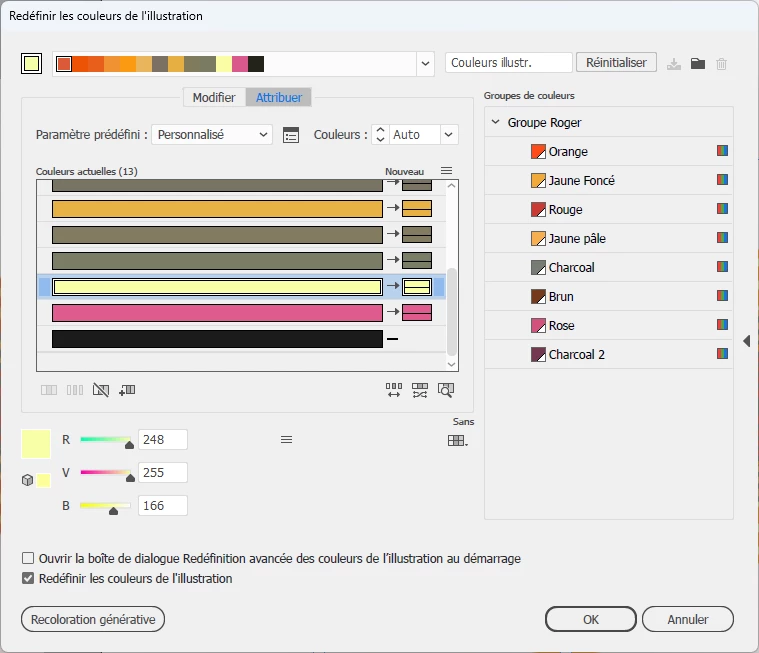
Currently selected in the list is that ugly "greenish yellow" color (I didn't make a swatch for as I went along). All I want is to "Assign" one of the Yellows ("Jaune foncé") on the right.
I tried every key Alt, Shift, Ctrl, nothing works as I click that swatch on the right. In response, Illustrator actually "splits" the yellow in the list in "two", left part becoming some "gray".
I'm stumped I can't find how to "Assign" an existing swatch to that greenish yellow in that interface.
I must be missing something grossly obvious... But I suspect the right pane in that interface is only for "saving" new groups, not for fetching color definitions from?


 AdChoices