
StakeholderDemocracy
Participating Frequently
May 1, 2020
Answered

Unable to remove black stroke (checked appearance panel)

  • May 1, 2020
  • 2 replies
  • 3772 views

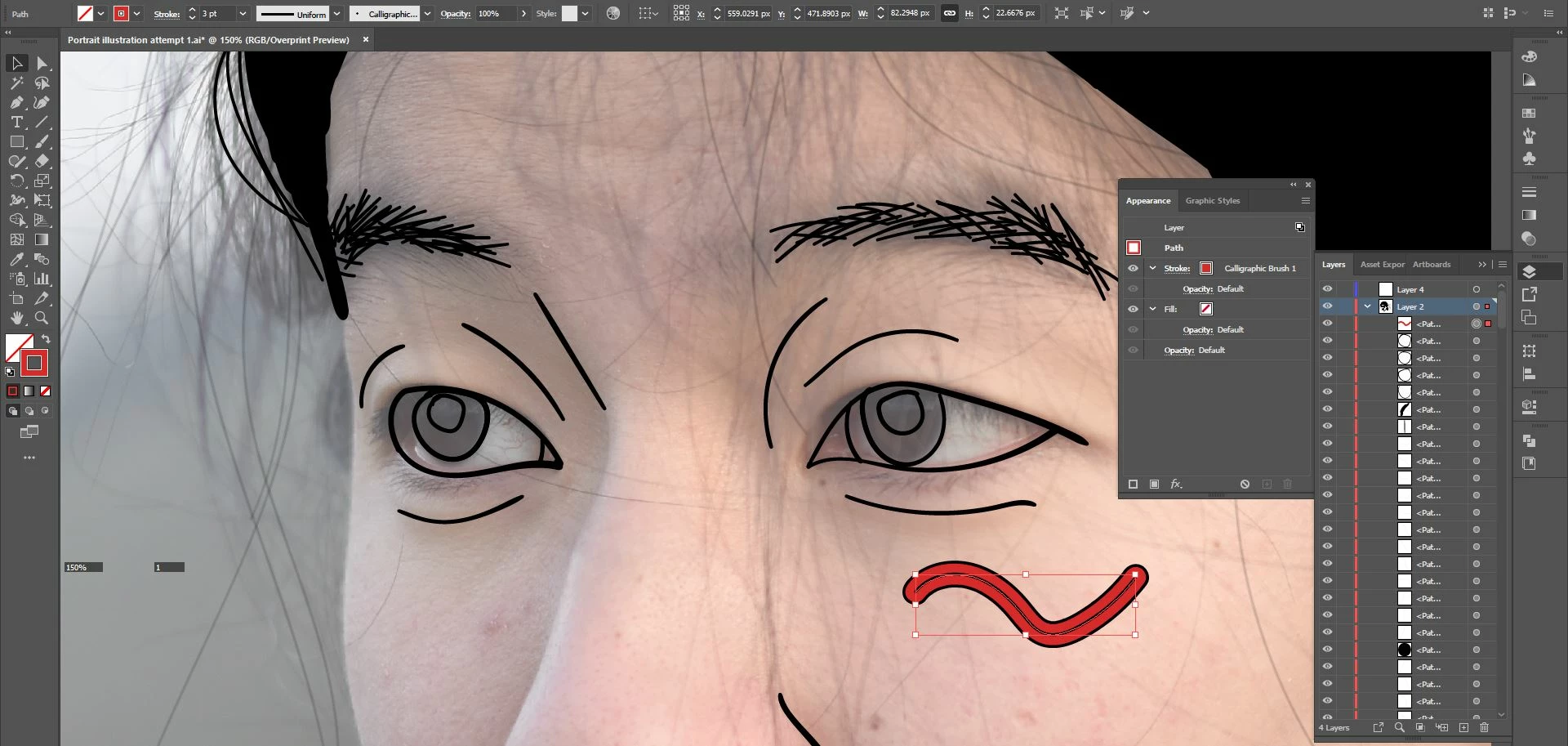
Illustrator CC on Win10. Suddenly, mid-work, everything has a black stroke that I can't get rid of! If I draw on a new layer it's fine, but I want to keep it on the same layer. As you can see from appearance panel, there's no default stroke applied. What's going on?! Any help appreciated--I did spend an hour on Google before posting this question...driving me crazy.


This topic has been closed for replies.
Correct answer Doug A Roberts

There is a stroke applied to the layer. Double-click on 'Layer' in the appearance panel and remove it.

2 replies

pixxxelschubser
Community Expert
Community Expert
May 1, 2020

Or simple drag the path (in the Layers Panel) from "Layer 2" to "Layer 4"

Doug A Roberts
Community Expert
Doug A RobertsCommunity ExpertCorrect answer
Community Expert
May 1, 2020

There is a stroke applied to the layer. Double-click on 'Layer' in the appearance panel and remove it.