
Inspiring
Jun 19, 2019 1:36 PM UTC
Answered

Unable to resize the object with Selection tool in Illustrator

I'm having an issue with selection tool to resize a text box.  I'm not sure why this is happening because it's never happened before.  When I click on the selection tool, it moves the object but does not resize it.  What's going wrong?
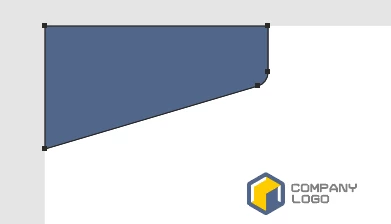
{Renamed by MOD}

    This topic is closed to new replies. Start a new post to keep the conversation going.
    Ton Frederiks
    Ton FrederiksCorrect answer
    Community Expert
    Jun 19, 2019 1:42 PM UTC

    Maybe View > Show Bounding Box?

    30 replies

    Ton Frederiks
    Community Expert
    Community Expert
    Jun 20, 2019 10:04 AM UTC

    I hope there is a way to get your money back.

    I cannot call this a template.

    It is one huge artboard with elements that look like pages, (but they are not) with a rectangle behind them to make it look like a dropshadow.

    No text, no fonts, all outlined.

    Just a single layer.

    It would require a lot of work to change the outlined text, to create artboards and set up a workable layer structure.

    And the document has un untagged RGB color profile which would require a lot of effort to make it suitable for professional printing.

    Translate
    Inspiring
    Jun 20, 2019 11:50 AM UTC

    Thanks Ton.  I was able to follow Meganchi directions and made it work and was able to print it. Thank you Meganchi.

    Translate
    Ton Frederiks
    Community Expert
    Community Expert
    Jun 20, 2019 4:03 PM UTC

    Good to hear that.

    But I think that a good template should not make it so difficult to use.

    Translate
    Ton Frederiks
    Community Expert
    Ton FrederiksCommunity ExpertCorrect answer
    Community Expert
    Jun 19, 2019 1:42 PM UTC

    Maybe View > Show Bounding Box?

    Translate
    Inspiring
    Jun 19, 2019 1:43 PM UTC

    Yes, that did it.  Thanks Ton.

    Translate
    Ton Frederiks
    Community Expert
    Community Expert
    Jun 19, 2019 1:45 PM UTC

    Glad to hear that worked for you.

    Translate