
interesting_Fountain5C46
Participant
Jun 16, 2023 5:36 PM UTC
Answered

Unable to uninstall photoshop beta

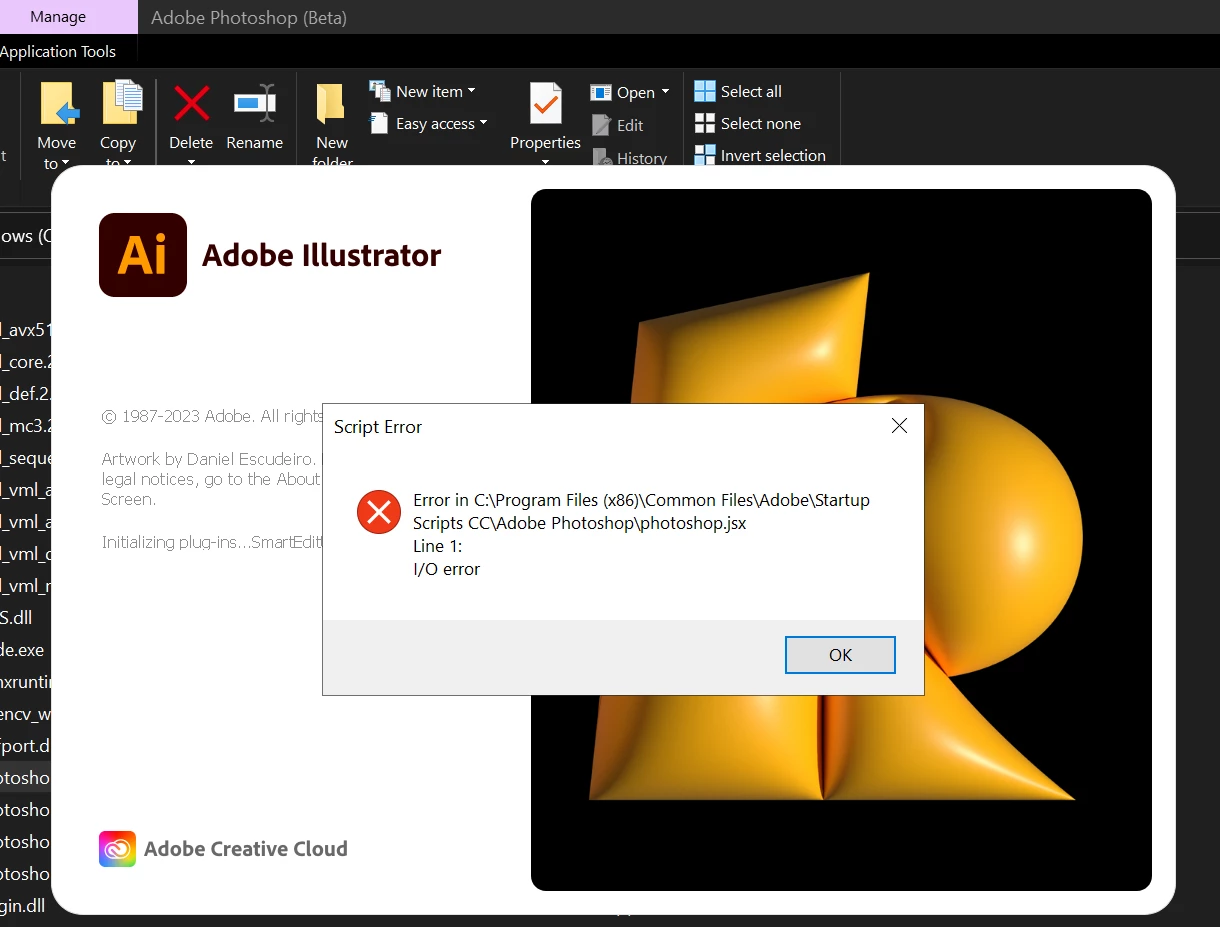
1) I had installed photoshop beta and illustrator. For the last few days while launching illustrator I am getting this error.

2) I cannot able to Uninstall photoshop beta. Every time I try to uninstall it takes me to creative cloud and nothing happens. On creative cloud it shows me it's getting uninstalled but I still see the software in my Laptop.
James28951438ly4uCorrect answer
Participant
Oct 17, 2023 10:23 AM UTC

Hey I had a similar issue to this but I searched for the photoshop beta file on my laptop then deleted it from files rather then uninstalling it from settings and it worked

10 replies

Participant
Nov 1, 2023 5:56 PM UTC

I had to go to PROGRAM FILES > Adobe > delete Adobe Phothoshop Beta exe file first. Then to my dashboard where I clicked on UNINSTALL again. And it finally uninstalled at that point.

Translate
James28951438ly4uCorrect answer
Participant
Oct 17, 2023 10:23 AM UTC

Hey I had a similar issue to this but I searched for the photoshop beta file on my laptop then deleted it from files rather then uninstalling it from settings and it worked

Translate
Participant
Jun 20, 2024 4:56 PM UTC

This worked. So simple. I couldn't believe it worked for a second.

Translate
Participant
Sep 26, 2023 10:38 PM UTC

When you open Creative Cloud, click the Apps icon on the left, and then scroll to the bottom of the list where it says Beta Apps, there you can uninstal the betas

Translate
Participant
Oct 11, 2023 8:21 AM UTC

I've tried this but it still doesn't work - I only have an option to install it from the Creative Cloud app, but it's still installed on my laptop Program Files.

Translate
Monika Gause
Community Expert
Community Expert
Oct 11, 2023 8:47 AM UTC

There is no uninstaller in the Photoshop Beta Application folder?

Translate
Monika Gause
Community Expert
Community Expert
Jun 16, 2023 5:49 PM UTC
interesting_Fountain5C46
Participant
Jun 17, 2023 10:00 AM UTC

I have already followed the above steps and tried to fix the problem, but nothing has happened. Could you kindly suggest another method to resolve this issue? Additionally, I also have another query regarding the uninstallation of Photoshop beta. Whenever I try to uninstall it, I am directed to the Creative Cloud desktop application where it appears to be uninstalling, but it is not actually being removed from my PC. I have checked and found that the software is still present on my computer. Please let me know how I can completely remove Photoshop beta from my PC. Thank you

Translate
Monika Gause
Community Expert
Community Expert
Jun 17, 2023 12:19 PM UTC

Maybe you could try the Adobe Cleaner tool to uninstall: https://helpx.adobe.com/creative-cloud/kb/cc-cleaner-tool-installation-problems.html 

Translate