
Participating Frequently
January 28, 2014
Answered

Unable to work with this Compound Shape

  • January 28, 2014
  • 1 reply
  • 1832 views

Good people of the forums,

I am working on a script that simplifies/consolidates art objects in documents that we eventually convert into FXG files.  I have run into a strange problem with a compound shape in one document. 

Normally upon encountering a "plugin item," the script selects the item and then runs an Expand Appearance so that it can begin to break it down to easier items.  In this case, Expand Appearance will not run, because the script seems to be unable to select the plugin item plus all of its children.  If I use the Layers palette to select the compound shape manually, outside of the script, Illustrator will select the compound shape and everything contained within it, like normal:
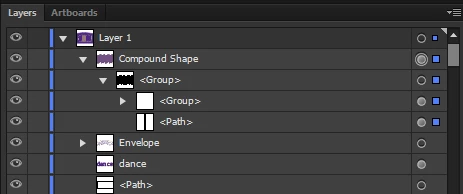
Yet, if I set the 'selected' property to true within the script, it selects the compound shape and any first-level children, but leaves any second level children (children of children) unselected, which makes Expand Appearance disabled:
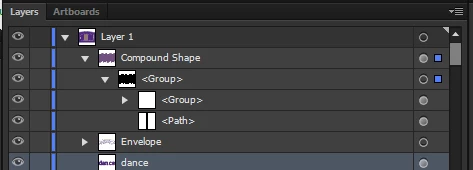
selection/expansion code looks like this:

    doc.pageItems.selected = true

    app.executeMenuCommand('expandStyle')

I thought of putting together a quick function that would accept a page item as an argument and select it along with all of its children, but in the case of plugin items I have been unable to access its children directly since there doesn't appear to be any such thing as [pluginItem].pageItems or [pluginItem].pathItems. 

I then figured maybe I could encapsulate the whole mess into a group so that I would have access to the groupObject.pageItems list and could select everything that way, but without selecting all the sub-children objects, Illustrator won't allow me to group them. 

I'm starting to feel like Yossarian with this thing.

This topic has been closed for replies.
Correct answer CarlosCanto

Sure thing.  Here is the difficult shape from the artwork just as it is in the original file, but saved for CS5 (instead of 6).

http://www.highrevproductions.com/CShape.ai


hmm...interesting, no can do

ok, doing the opposite seems to work, start with everything selected, then in your script check each pageItem, if it is NOT a pluginItem, deselect it.

1 reply

CarlosCanto
Community Expert
Community Expert
January 29, 2014

how did you create that pluginItem?

and just to make sure, select your pluginItem and run this script, you do get a "pluginItem", right?

var idoc = app.activeDocument;

var sel = idoc.selection[0];

alert(sel.typename);

CarlosCanto
Community Expert
Community Expert
January 29, 2014

I was able to replicate your problem,

try this

// select compound shapes with groups and loose items in it

// carlos canto

// http://forums.adobe.com/thread/1392150?tstart=0

var idoc = app.activeDocument;

idoc.pluginItems[0].selected = true;

var temp = idoc.selection[0];

temp.selected = true;

Participating Frequently
January 29, 2014

Thanks for the reply, Carlos.

I tried selecting the plugin Item via doc.pluginItems[0], and then the temp variable like you wrote.  Even with all of that, Illustrator still only selects the 1st and 2nd-level objects, ignoring everything further down.

Part of what makes this script tricky is that it has to process hundreds of old and new artworks by several different artists, so standard practices are difficult to enforce and the script must be able to process all kinds of unexpected art setups.  Some of these setups are inefficient, messy, and poorly constructed, but we still have to try to break them down and process them.

In this particular case, we're looking now at having the script run a custom action we wrote that uses the pathfinder to release the compound shape.  Problem is, the artist set up this art so that the fill and stroke attributes were assigned to the compound shape, but not the elements contained within it.  When we run the release action, we lose all of the fill and stroke information.  I'd try to store those values first and then re-apply them later, but with plugin items being as....  well supported... as they are, [pluginItem].fillColor returns undefined.