
Question
Unexpected selection after flatten transparency
After you execute the “FlattenTransparency” command on a selected object, normally that object remains selected. However, in the following case, two objects, left and right, form a group that will be selected after the script completes.
The script pre-fills arrayNoFill, which contains one right clip group. Consequently, I expected that Flatten Transparency would not affect other objects. Why is this happening?
The script pre-fills arrayNoFill, which contains one right clip group. Consequently, I expected that Flatten Transparency would not affect other objects. Why is this happening?
var arrayNoFill = [];
...
alert("Found " + arrayNoFill.length + " unfilled clipping mask(s)."); // found 1
alert('active layer: ' + doc.activeLayer.name);

// at this point nothing selected

for (var i = 0; i < arrayNoFill.length; i++) {
    arrayNoFill[i] = true;
}

#include "../path/flatten_transparency.jsx"
For some reason at this point the green shape is also selected and it makes group with the Clip Group on the right.
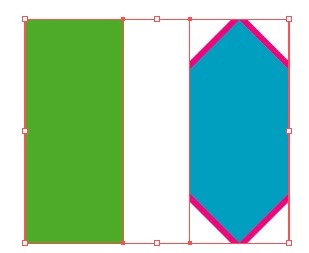
Here is an action string I found somewhere on the forum which I use here to flatten transaprenty:
"/version 3 /name [ 7 466c617474656e ] /isOpen 1 /actionCount 1 /action-1 { /name [ 20 466c617474656e205472616e73706172656e6379 ] /keyIndex 0 /colorIndex 0 /isOpen 1 /eventCount 2 /event-1 { /useRulersIn1stQuadrant 0 /internalName (adobe_selectAll) /localizedName [ 10 53656c65637420416c6c ] /isOpen 0 /isOn 1 /hasDialog 0 /parameterCount 0 } /event-2 { /useRulersIn1stQuadrant 0 /internalName (ai_plugin_flatten_transparency) /localizedName [ 20 466c617474656e205472616e73706172656e6379 ] /isOpen 0 /isOn 1 /hasDialog 1 /showDialog 0 /parameterCount 5 /parameter-1 { /key 1920169082 /showInPalette 4294967295 /type (integer) /value 75 } /parameter-2 { /key 1919253100 /showInPalette 4294967295 /type (unit real) /value 300.0 /unit 592342629 } /parameter-3 { /key 1869902968 /showInPalette 4294967295 /type (boolean) /value 1 } /parameter-4 { /key 1869902699 /showInPalette 4294967295 /type (boolean) /value 1 } /parameter-5 { /key 1667463282 /showInPalette 4294967295 /type (boolean) /value 1 } } }"
It turns out this action has adobe_selectAll – how to properly remove it from there without snagging the extra?


 AdChoices