

Ghulam Mohyuddin
Known Participant
August 27, 2024
Answered

Unexpected Vertical Shift in Dividers in Rectangular Grid Tool in Adobe Illustrator

  • August 27, 2024
  • 2 replies
  • 511 views


I have a 100x100 pt grid in Adobe Illustrator, divided by 5 horizontal dividers. With the skew value set to 0 in the Rectangular Grid Tool, these dividers are evenly spaced. However, when I increase the skew value to 10%, I observe the following vertical shifts in the dividers:

- The topmost divider moves upward by 3.71 pt.
- The next divider moves upward by 6.12 pt.
- The middle divider moves upward by 7.1 pt.
- The fourth divider moves upward by 6.52 pt.
- The bottommost divider moves upward by 4.12 pt.

Given that the distance between the top horizontal divider and the rectangular frame is 16.67 pt, a 10% skew should theoretically result in a movement of 1.667 pt. However, I observe a movement of 3.71 pt instead.

Could you please explain why the top divider moves by 3.71 pt instead of the expected 1.667 pt when a 10% skew is applied?
 

This topic has been closed for replies.
Correct answer Kurt Gold

Are you kidding?


Your descriptions as well as your screenshot are nonsense.


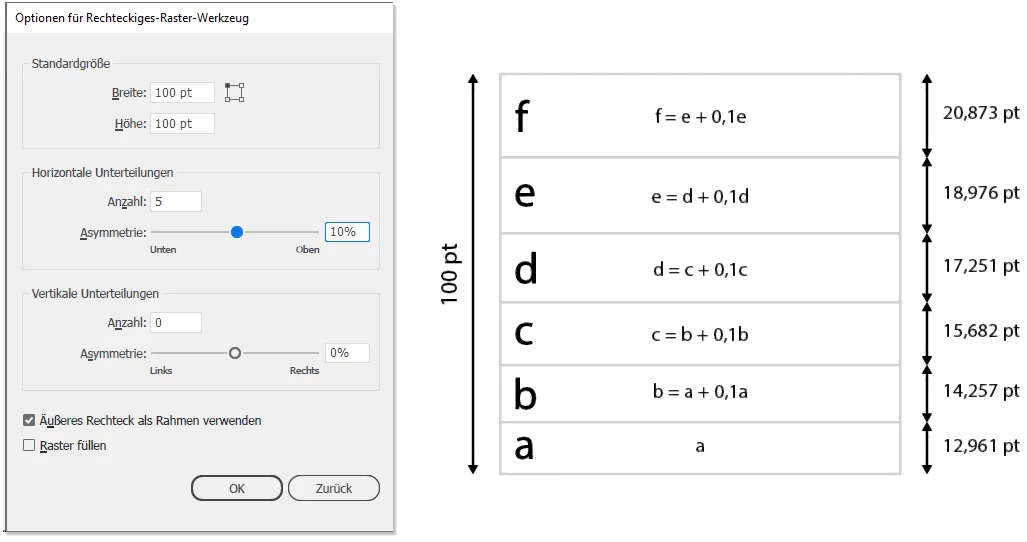
As per your settings for the grid, this is what Illustrator creates (with correct calculations for the Skew setting):


2 replies

Kurt Gold
Community Expert
Kurt GoldCommunity ExpertCorrect answer
Community Expert
August 27, 2024

Are you kidding?


Your descriptions as well as your screenshot are nonsense.


As per your settings for the grid, this is what Illustrator creates (with correct calculations for the Skew setting):


Ghulam Mohyuddin
Known Participant
August 28, 2024

Dear Kurt Gold Sir,

I sincerely appreciate the time you took to explain how skewing works in the Rectangular Grid tool. Your guidance has clarified something I wasn't aware of before, and I'm truly grateful for your help. Thank you for your patience and for sharing your knowledge with me. I hope my question didn't cause any inconvenience.

Warm regards,
[Ghulam Mohyuddin]

Anshul_Saini
Community Manager
Community Manager
August 27, 2024

Hi Ghulam Mohyuddin,


I can see why this unexpected behavior would be confusing, especially when you’re expecting a specific mathematical outcome.


The issue you’re describing with the Rectangular Grid Tool’s skew function likely relates to how Illustrator calculates and applies the skew.


If you need precise control over the movement, you might need to manually adjust the dividers after applying the skew or experiment with different skew values to achieve the exact spacing you want.


Let us know if you need further assistance!


Best regards,

Anshul Saini