Answered
unicode Nepali not working correctly
I copied and paste from Try Google Input Tools online – Google Input Tools. It's rendering like this in illustrator
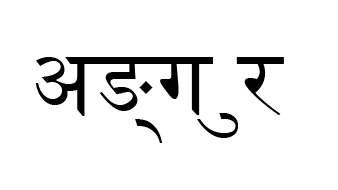
It should be
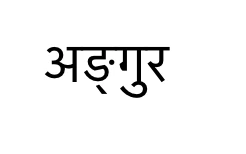
How can I fix it?

I copied and paste from Try Google Input Tools online – Google Input Tools. It's rendering like this in illustrator
It should be
How can I fix it?
Hi Yuren,
Could you please try the steps (in Illustrator CC) as mentioned in the help document: Formatting Asian characters in Illustrator and let us know if this helps?
Regards
Twarita
Already have an account? Login
No account yet? Create an account
Enter your E-mail address. We'll send you an e-mail with instructions to reset your password.


 AdChoices