Answered
unify pattern swatch
Hello, I have a pattern swatch in an object but it is showed as not unified design but breaks appear. Could you please help with how to have this unified in the object?
Thank you and best regards,
Hello, I have a pattern swatch in an object but it is showed as not unified design but breaks appear. Could you please help with how to have this unified in the object?
Thank you and best regards,
If you are using one of the pattern swatches that came with Illustrator, be assured that they will tile seamlessly even though they sometimes look like they have breaks. The pattern below is called Water Lilies and is in the Nature_Foliage group. Zooming in to 800% I can see a line where the pattern tiles meet. However, it is just a screen aberration and will print seamlessly. When viewed at 100%, it is not visible.

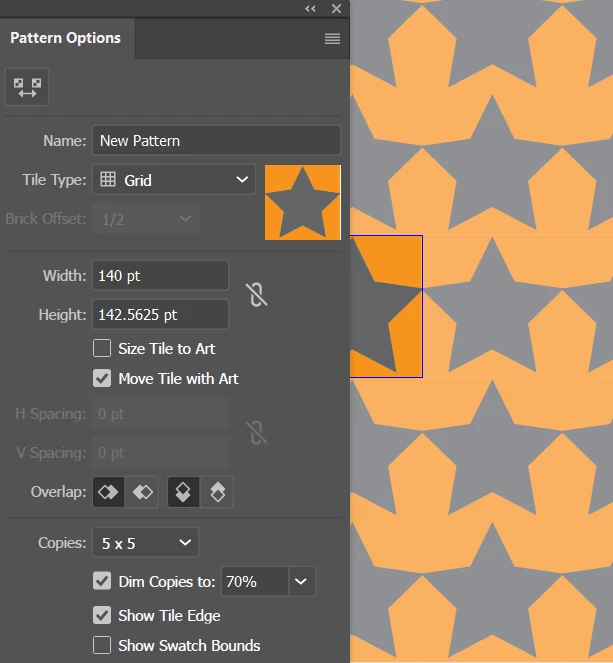
If the pattern is one that you created yourself, you would need to check the settings in the Pattern Options panel. For example, in the pattern below, there is an obvious gap.
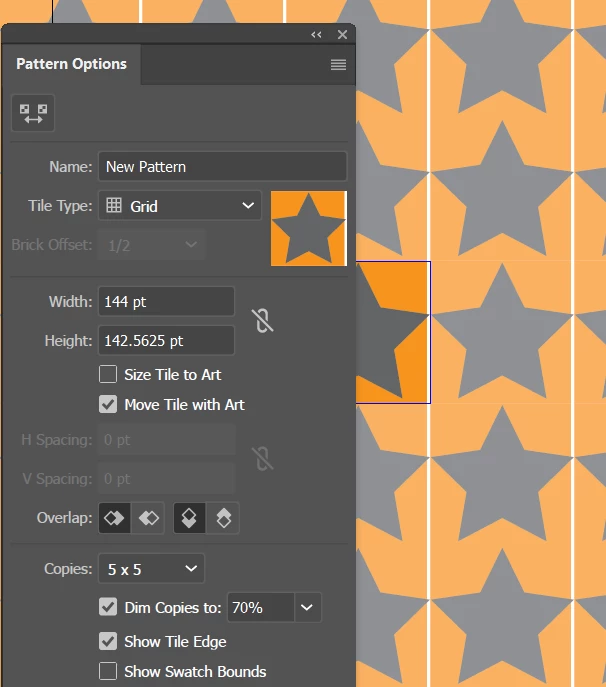
But reducing the Width from 144 to 140 has eliminated the gap.
Already have an account? Login
Enter your E-mail address. We'll send you an e-mail with instructions to reset your password.
 AdChoices