
thejanebradbury
Community Expert
Community Expert
August 4, 2023
Answered

Unknown error [UKCO] after updating Illustrator to v27.8

  • August 4, 2023
  • 32 replies
  • 7747 views

This error screen popped up initially during the launch of Illustrator. I clicked it, it went away and as Illustrator opened I thought maybe it was a one-time thing. 


But it pops up with every command change: change tool change colour etc.. You literally can't do anything without it appearing. 
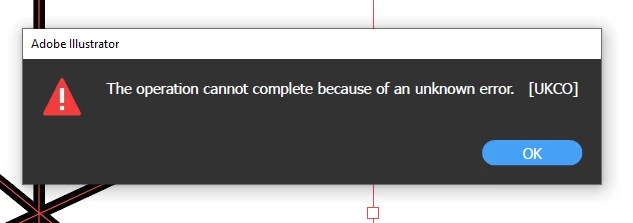
 

Is anyone else getting this error?  

This topic has been closed for replies.
Correct answer Anubhav M

Hello everyone,


Thanks for your patience. Our team has made some improvements in the latest version of Illustrator v27.8.1, which should help alleviate the trouble you're having with Illustrator. Would you mind trying to update to the latest Illustrator version and sharing your observations?


Looking forward to hearing from you.


Thanks,

Anubhav

32 replies

Anubhav M
Community Manager
Anubhav MCommunity ManagerCorrect answer
Community Manager
August 9, 2023

Hello everyone,


Thanks for your patience. Our team has made some improvements in the latest version of Illustrator v27.8.1, which should help alleviate the trouble you're having with Illustrator. Would you mind trying to update to the latest Illustrator version and sharing your observations?


Looking forward to hearing from you.


Thanks,

Anubhav

Participant
August 9, 2023
Hi I called customer services and they had to deinstall and reinstall the
version, thank goodness some people know what they are doing, the
technician did save my workspace on my desktop and i haven't lost any of my
preferences.
Guylaine Charlebois


Visitez mes liens et boutiques <>
Participant
August 11, 2023

Adobe Illustrator 2023 v27.8.1
The same connection file cannot be replaced at once,
The same connection file from the previous version can be replaced at once
相同的连接文件不能一次替换了,
之前的版本相同的连接文件是可以一次替换的

Participant
August 9, 2023

I am in Canada and getting this error. 


Monika Gause
Community Expert
Community Expert
August 9, 2023

@Elizabeth5EAF  schrieb:

I am in Canada and getting this error. 


Please read the post by Anshul at the top of this page.

iD3Z1GN
Inspiring
August 9, 2023

It's now 2023 The problem again exists. On a MAC OS11.7.9 the UXP folder does not contain Extensions

This work around is not working. Adobe is costing me a fortune and holding my work back EXTREMELY UPSETTING!!

Anshul_Saini
Community Manager
Community Manager
August 8, 2023

Hi Everyone,


We understand the frustration you're facing with the "UKCO" error in Illustrator 27.8. The product team is aware of this issue and has already worked on a fix. The solution will be included in the upcoming release. To stay updated and receive the fix, I recommend upvoting this UserVoice (https://illustrator.uservoice.com/forums/601447-illustrator-desktop-bugs/suggestions/47043832-illust...)

In the meantime, you can try a workaround by removing the "Vectorizing Presets" from the preferences folder. Please note that any custom presets created in the previous releases for image trace might not appear after deleting this file.

Preferences folder location:

Windows - " %AppData%\Adobe\Adobe Illustrator 27 Settings "

Copy & paste this location into the My PC address bar.

Mac - " ~/Library/Preferences/Adobe Illustrator 27 Settings "


Note: Location starting with this "~" sign indicates the User Library, which is hidden. So, you need to copy & paste the exact path in spotlight search or from Finder Menu > Go > Go to Folder > Paste the location in the dialog box like this:


If you have any other questions or need further assistance, feel free to ask. We appreciate your patience!


Best regards,
Anshul Saini

Participating Frequently
August 9, 2023

I had to roll back to the last version because of this bug. But I've lost all the preference settings. Is there a way to retrieve those settings or they are forever lost? 

Monika Gause
Community Expert
Community Expert
August 9, 2023

They are probably gone. 

Unless you have something like Time Machine running where you can try and get them out of the backup.

Participant
August 8, 2023

Same error here. Made AI unusable and I had to downgrade to the previous version and reconstruct my setup. Doesn't Adobe thoroughly test the updates before releasing them?

Participant
August 8, 2023

I'm getting the same. Any news from Adobe?


Participant
August 8, 2023

I have had the same issue.

Reverted to previous version but in the process I lost all my Illstrator settings.. basically like going back to square 1.

I have lost most of the day as a result.

Is it possible to recover your settings - when I recovered them from an older verison of the folder (v26) it still didn't bring them across). 

Any help would be greatly appreciated.

Cheers.


Creative Overlord
Known Participant
August 7, 2023


Error message: "The operation cannot complete because of an unknown error [UKCO]"

Software version: Illustrator v 27.8

Hardware: Mac Studio M1 MAX

OS: macOS Ventura 13.5 (22G74)


can't open Illustrator since the v 27.8 update (in Australia) - I get the "The operation cannot complete because of an unknown error [UKCO]" message on trying to open it from doc or even when opening from the creative cloud window > "Updated recently" section.


Restart was no help.  

kglad
Community Expert
Community Expert
August 7, 2023

in the future, to find the best place to post your message, use the list here, https://community.adobe.com/

p.s. i don't think the adobe website, and forums in particular, are easy to navigate, so don't spend a lot of time searching that forum list. do your best and we'll move the post if it helps you get responses.


<"moved from using the community">
Matthew A
Inspiring
August 7, 2023

Just chipping in to say — WTF Adobe!!

First of all we have the new Bridge being unable to open new windows, now an unuseable update to Illustrator.

I also get a [UKCO] error every time I do anything on the new illustrator. I have tried disabling Livesurface plugin (no joy) — only other plugins I have are the Astute Graphoics ones, I dont think its that either...


Wasting our time with these 'updates' — more like hobbling the workday.


Participant
August 8, 2023

Same problem here - Macbook Pro 16" OS 10.15.7 - latest version of Illustrator. UKCO message popped up for the first time this morning. I initially suspected an Illustrator file I was sent and tried to edit - where it popped up continually as reported above. Did an unistall/reinstall just of Illustrator same latest version, and all seems cured. Didn't do anything else. Perhaps Adobe fixed it between instals??

Participant
August 7, 2023

Same here. Reverted to an older version

Julie Chapalain
Inspiring
August 7, 2023

Hi everyone ! I have called the Adobe center and the problem is solved for me. According to the agent, my account had mutilple problem. I am putting them all here, it might be one of these for you guys aswell :

- I have two email address which I use (one with a subscription, and the other without) which created a conflict into the Adobe system

- I had to clean up the internal Mac Keychain Access because I had really old certificated (3 years old) which created some conflict in the Adobe System

- The agent made me uninstall the Creative Cloud app and the Illustrator app aswell, and install them back

I have lost all my preferences but now everything works with the latest version.

I advice you to contact the support and check with someone because those issues might be related to my account only.

Good luck for everyone.

Julie

La Gargouille
Participating Frequently
August 7, 2023

Thanks Julie ! Merci pour ces précisions qui vont aider chacun d'entre nous. Pour ma part, j'ai installé une ancienne version qui a résolu le problème mais ce n'était qu'une solution temporaire. Merci beaucoup pour ton post !