Inspiring
September 20, 2017
Resuelto

Unknown error when trying to save Pattern Swatches in AI CS6

  • September 20, 2017
  • 4 respuestas
  • 3030 visualizaciones

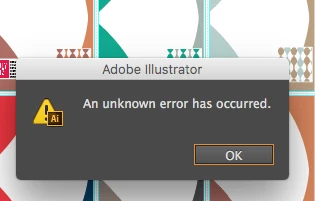
This is whats showing up every now and then. It's a little frustrating as I can seem to pick which one will error. Anyone else get this problem? I'm using CS6

Thanks in advance
    Este tema ha sido cerrado para respuestas.
    Mejor respuesta de brendaD-tHHqZp

    Hi

    I have let this issue go it seemed to be a corrupt file as it was I didn't have to do it with 4 rows of design they only wanted one row for printing and this eliminate all issues with the file. 

    Thanks

    4 respuestas

    Srishti Bali
    Legend
    November 23, 2017

    Hi brendaD,

    I would like to know if the steps suggested above worked for you, or the issue still persists.

    Kindly update the discussion if you need further assistance with it.

    Thanks,

    Srishti

    brendaD-tHHqZpAutorRespuesta
    Inspiring
    November 29, 2017

    Hi

    I have let this issue go it seemed to be a corrupt file as it was I didn't have to do it with 4 rows of design they only wanted one row for printing and this eliminate all issues with the file. 

    Thanks

    Mike_Gondek10189183
    Community Expert
    Community Expert
    September 20, 2017

    Update to 16.04

    Adobe - Illustrator : For Macintosh

    CS6 would work better with an earlier versions of mac OS. Don't upgrade to high Sierra coming out 9/25/2017 you will will experience  more issues with CS6.

    Older versions of Adobe Illustrator system requirements

    Since the problem is sporadic sounds  more like a problem of  corrupted or lacking ram. If you restart you computer will you be able to export the same swatches.

    Do you have anything making the swatches complex such as embedding image and using a tile type besides grid. What is the final size of you .ase or .ai that you are exporting you patterns to?

    Not sure what you swatch names are, but stay away from colons and slashes or periods.

    Monika Gause
    Community Expert
    Community Expert
    September 20, 2017

    Please tell us the exact steps that led to this error.

    Inspiring
    September 20, 2017

    I have saved swatches 100 times over this has just been a recent problem

    I would select the the swatches

    the select save swatches as AI

    then usually name them and hit save

    its like one in every 5 does this. 

    It also started saving my PDF with a font (like how swatches save) and not the pattern image, so I have to reset AI for it to stop doing it by doing this:

    Try holding Cmd-Opt-Ctrl-Shift when restarting AI on a Mac or Alt-Crtl-Shift on a PC to reset the preferences to the factory defaults.

    I have a mac

    These are both new problems that have arisen in the last 6 months. 

    Monika Gause
    Community Expert
    Community Expert
    September 20, 2017

    So this has started in the last 6 months - which system is it? Are you probably on Sierra or even High Sierra? This might cause issues with CS6, it might not be compatible. Nobody knows, because nobody fully tests it anymore.

    One in every five might also point to issues with your files. Are these old files? Does it help if you copy the patterns to a new file?

    As for the PDFs: this points so some errors when saving files - they don't have PDF content. Where do you save them and with which options? Illustrator in many occasions has serious errors when saving to remote locations (servers, networks) as well as synched folders.

    kautuksahni
    Adobe Employee
    Adobe Employee
    September 20, 2017

    Moving this question to the Adobe  Illustrator's community.

    ~kautuk