Participant
November 24, 2016
Answered

'Unknown error' with saving file after upgrading to CC 2017

  • November 24, 2016
  • 1 reply
  • 561 views

I just upgraded to Illustrator CC 2017.

Now my files will not save, I get the notification: 'An unknown error has occured'.

- I tried saving with a different name. No success

- I tried saving with deselecting the 'Create PDF Compatible File' option. No success

- I tried removing the Adobe Illustrator 21 settings folder in Preferences, but keep having the problem.

I am running
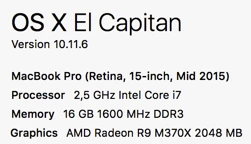
Does someone know a solution?

Please without outline stuff, as this is a work file.

Thank you.

This topic has been closed for replies.
Correct answer Pieter de Wit

I have found a workaround:

- From the layer with the most texts I selected and deleted all the contents

- I saved with a different file name -> This worked!

- After that I pressed Cmd+Z and got everything back

- I saved again, No Error!

1 reply

Pieter de WitAuthorCorrect answer
Participant
November 24, 2016

I have found a workaround:

- From the layer with the most texts I selected and deleted all the contents

- I saved with a different file name -> This worked!

- After that I pressed Cmd+Z and got everything back

- I saved again, No Error!