
AlfiSeptandhi
Participating Frequently
September 5, 2017
Answered

Unknown Guide Lines Appeared After Slicing

  • September 5, 2017
  • 3 replies
  • 454 views

So, I created this picture and I want to upload it on instagram, so I slice it into 3 column with guide lines. But after I use Object-Slice-Create form Guides, the result is not as I expected, there are another line appeared. I dont know where these line came from. Can anyone help me to clear this unwanted lines?

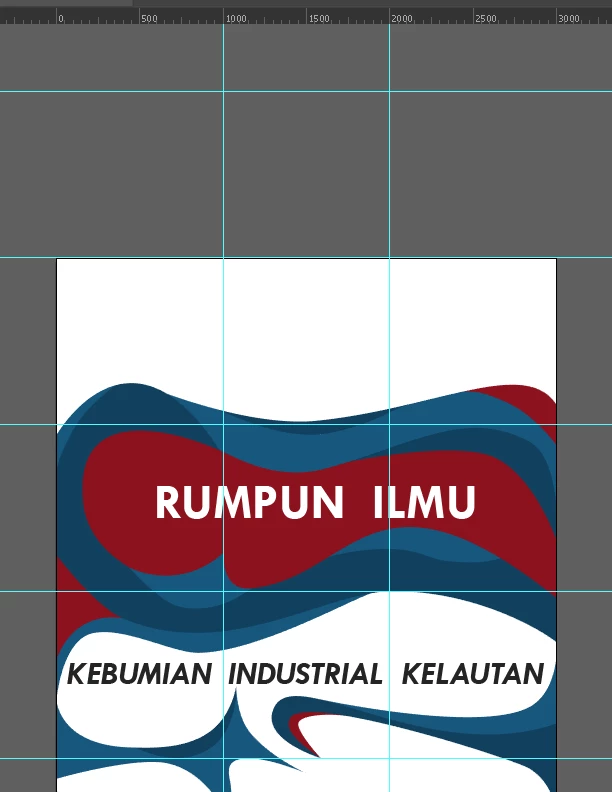
This is the picture before I slice from guides..
And this is what happened after I use slice from guides..
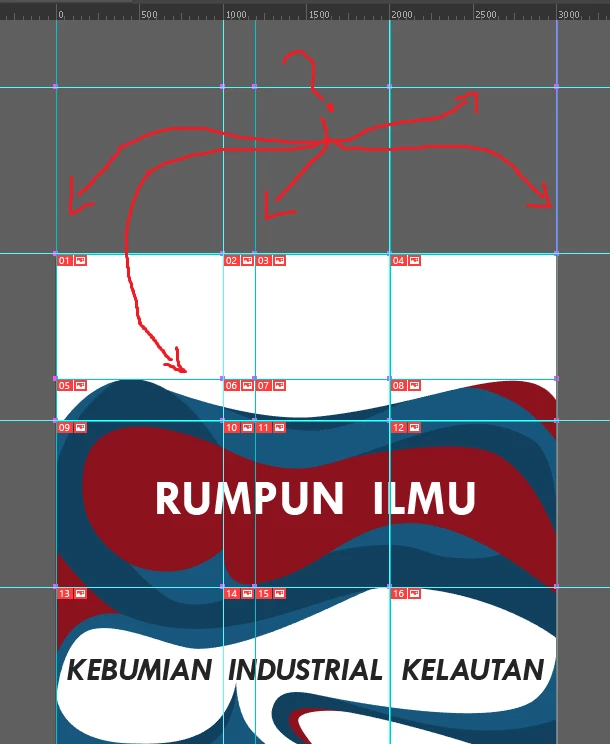
As you see, there are some unwanted lines appeared after I slice from guide lines.

This topic has been closed for replies.
Correct answer PrepressPro1

Go to Menu>View>Guides>Unlock Guides. You should be able to select the guides and delete them as you would any other object.

3 replies

PrepressPro1
PrepressPro1Correct answer
Legend
September 5, 2017

Go to Menu>View>Guides>Unlock Guides. You should be able to select the guides and delete them as you would any other object.

Myra Ferguson
Community Expert
Community Expert
September 5, 2017

I suspect there may have been some stray points that caused Illustrator to make the additional slices. If you still want to slice by guides, try selecting all then deselecting your artwork and delete the guides. Make sure there there aren't any stray points that also need to be deleted and try the Object > Slice > Create from guides again.

AlfiSeptandhi
Participating Frequently
September 5, 2017

I've clean up all the stray points and the result still same. The unwanted lines still exists..

Monika Gause
Community Expert
Community Expert
September 5, 2017

Just use the Slice tool to create your slices manually.