


Inspiring
August 14, 2025
Answered

Unusual behaviour in transparency blend modes
  • August 14, 2025
  • 2 replies
  • 355 views

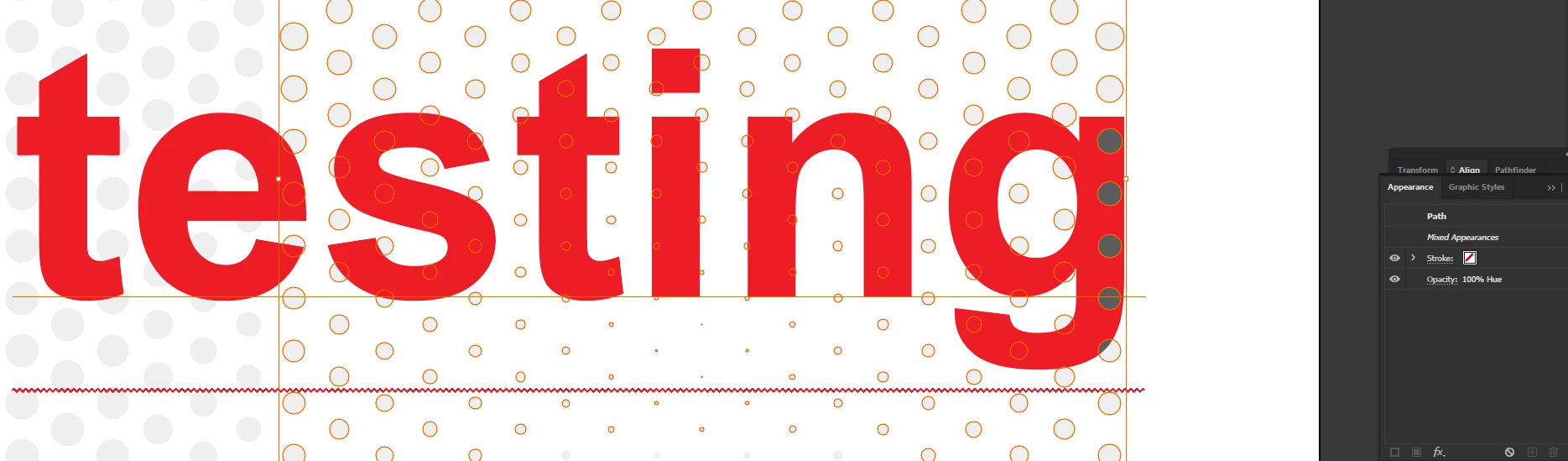
I am trying to develop a graphic design scheme wherein the overlapping area of circles on the text changes its colour. I used 'hue' in the transparency blend mode.


However, I'm seeing a peculiar behaviour by illustrator where it's only affecting the last vertical row of the circles even though all the circles have the same appearance. What is happening and how to solve it?


Here's the file. 

https://www.dropbox.com/scl/fi/brrkqbuqhlwrkk8zu4il7/PATTERNTEST.ai?rlkey=3adslb6w9p0eipe7vpixkc9xh&st=1e5o1j5j&dl=0


For some weird reason, illustrator files after getting attached gives this error and I am unable to share the file directly. 

 

Correct answer Mike_Red

Also. Is it possible that the items are in separate layers and the blend mode still works? I have to keep them in the same layer to enable the blend mode's functionality. 


Ok. It works. My layer order was incorrect. Thanks!

2 replies

Kurt Gold
Community Expert
Community Expert
August 14, 2025

The circles left to the last vertical row have an additional blend mode (Darken) applied to their fills (see Appearance panel).

It should work as expected if you remove the Darken mode.

Ton Frederiks
Community Expert
Community Expert
August 14, 2025

Select one problem dot and look at the Appearance panel.

The ones that do not work have an additional blend mode: Darken.


Mike_RedAuthor
Inspiring
August 14, 2025

Thank you so much! That fixed it. 

Mike_RedAuthor
Inspiring
August 14, 2025

Also. Is it possible that the items are in separate layers and the blend mode still works? I have to keep them in the same layer to enable the blend mode's functionality.