Participant
January 31, 2024
Answered

Update name of the object based on text located in that object?

  • January 31, 2024
  • 2 replies
  • 438 views

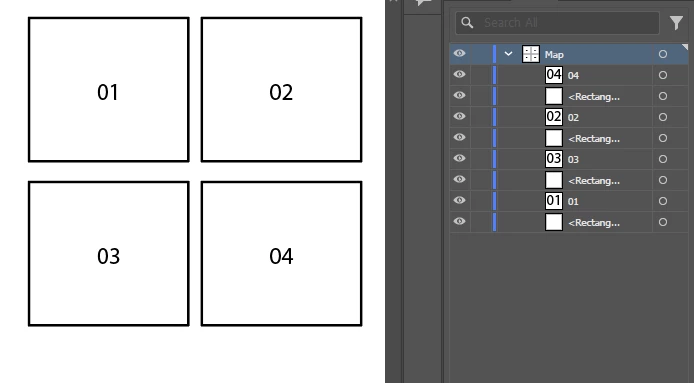
Looking for a way (hopefully in a mass) to update name of the object (<Rectangle>) to mach the text that is located inside of that rectangle.


Basically to go form this:


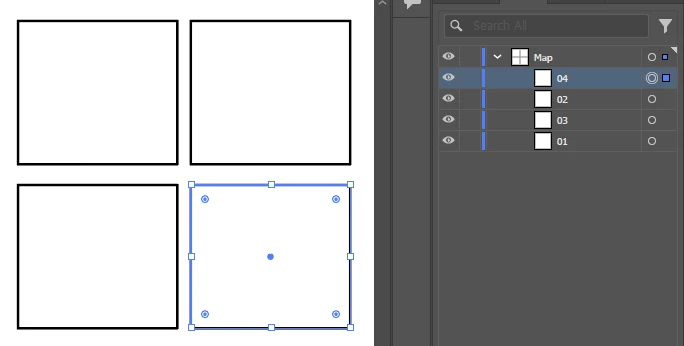
Into this:


Any scripts out there?


Thank you


This topic has been closed for replies.
Correct answer femkeblanco

As requested, try this for polygons other than rectangles.  This should work for the text frame whose centre lies within the path (without depending on the bounding boxes).

var doc = app.activeDocument;
var items = doc.pathItems;
var text = doc.textFrames;

for (var i = items.length - 1; i > -1; i--) {
    for (var j = text.length - 1; j > -1; j--) {
        var textBounds = text[j].geometricBounds;
        var centre = [
            textBounds[0] + ((textBounds[2] - textBounds[0]) / 2), 
            textBounds[1] + ((textBounds[3] - textBounds[1]) / 2)
        ];
        if (pointIsInPoly(items[i].pathPoints, centre)) {
            items[i].name = text[j].contents;
            text[j].remove();
            continue;
        }
    }
}

// Jonas Raoni Soares Silva
// http://jsfromhell.com/math/is-point-in-poly
function pointIsInPoly(poly, pt){
    for(var c = false, i = -1, l = poly.length, j = l - 1; ++i < l; j = i)
        ((poly[i].anchor[1] <= pt[1] && pt[1] < poly[j].anchor[1]) || 
         (poly[j].anchor[1] <= pt[1] && pt[1] < poly[i].anchor[1])) 
        && 
        (pt[0] < 
         (poly[j].anchor[0] - poly[i].anchor[0]) * (pt[1] - poly[i].anchor[1]) / 
         (poly[j].anchor[1] - poly[i].anchor[1]) + poly[i].anchor[0]) 
        && 
        (c = !c);
    return c;
}
2 replies

femkeblanco
femkeblancoCorrect answer
Legend
February 9, 2024

As requested, try this for polygons other than rectangles.  This should work for the text frame whose centre lies within the path (without depending on the bounding boxes).

var doc = app.activeDocument;
var items = doc.pathItems;
var text = doc.textFrames;

for (var i = items.length - 1; i > -1; i--) {
    for (var j = text.length - 1; j > -1; j--) {
        var textBounds = text[j].geometricBounds;
        var centre = [
            textBounds[0] + ((textBounds[2] - textBounds[0]) / 2), 
            textBounds[1] + ((textBounds[3] - textBounds[1]) / 2)
        ];
        if (pointIsInPoly(items[i].pathPoints, centre)) {
            items[i].name = text[j].contents;
            text[j].remove();
            continue;
        }
    }
}

// Jonas Raoni Soares Silva
// http://jsfromhell.com/math/is-point-in-poly
function pointIsInPoly(poly, pt){
    for(var c = false, i = -1, l = poly.length, j = l - 1; ++i < l; j = i)
        ((poly[i].anchor[1] <= pt[1] && pt[1] < poly[j].anchor[1]) || 
         (poly[j].anchor[1] <= pt[1] && pt[1] < poly[i].anchor[1])) 
        && 
        (pt[0] < 
         (poly[j].anchor[0] - poly[i].anchor[0]) * (pt[1] - poly[i].anchor[1]) / 
         (poly[j].anchor[1] - poly[i].anchor[1]) + poly[i].anchor[0]) 
        && 
        (c = !c);
    return c;
}
voscekmAuthor
Participant
February 12, 2024

Works really well with all different shapes. Thank you very much for your help. Both answers are correct, just use for both could be slightly altered. Amazing job again!

femkeblanco
Legend
January 31, 2024

Untested.

var doc = app.activeDocument;
var items = doc.pathItems;
var text = doc.textFrames;

for (var i = 0; i < items.length; i++) {
    var itemBounds = items[i].geometricBounds;
    for (var j = text.length - 1; j > -1; j--) {
        var textBounds = text[j].geometricBounds;
        if ((textBounds[0] > itemBounds[0] && textBounds[0] < itemBounds[2]) && 
            (textBounds[1] < itemBounds[1] && textBounds[1] > itemBounds[3])) {
        items[i].name = text[j].contents;
        text[j].remove();
        continue;
        }
    }
}
voscekmAuthor
Participant
February 1, 2024

Works like magic! Thank you very much.