kpooty47
Participating Frequently
February 19, 2018
Question

updating paths to filled shape region

  • February 19, 2018
  • 3 replies
  • 671 views

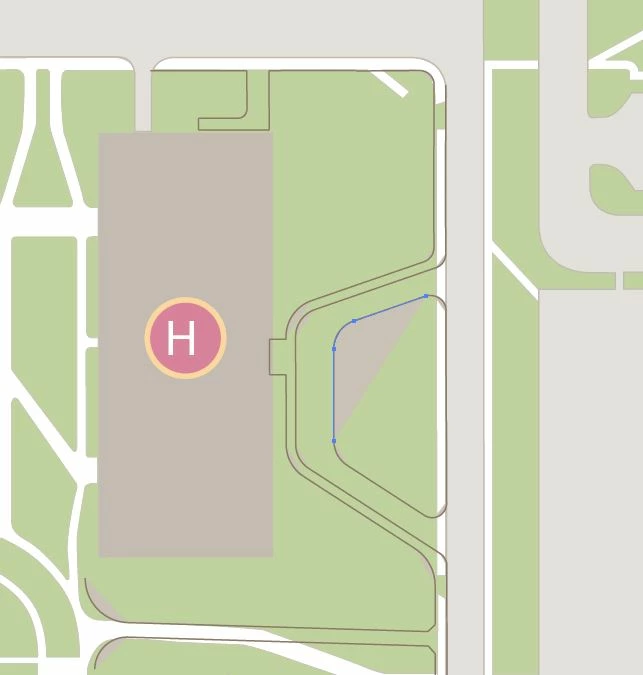
I received this Ai file from a person who previously this work. I need to update this driveway and sidewalk. They have it set up as filled shape regions I belive. I am not familiar with this really. See attached - what is greyed out is there original drive (grey) I am trying to add this drop off area to there existing "shape". Thanks!
    This topic has been closed for replies.

    3 replies

    sharp_hands16B8
    Community Expert
    Community Expert
    February 19, 2018

    This is a good case study as to why the new Shape Merge tool in Illustrator CC is so helpful. It would allow you to select those individual parts and "paint them together" using the Merge Shape Tool icon like a brush.

    Doug A Roberts
    Community Expert
    Community Expert
    February 19, 2018

    can you select the existing paths?

    kpooty47
    kpooty47Author
    Participating Frequently
    February 19, 2018

    I was able to do the main drop off driveway by creating it as its own entity/shape and just sending to back. I'd prefer to do it the way you are mentioning. In blue is another drive I need to add, however, I get this message. Thanks

    Monika Gause
    Community Expert
    Community Expert
    February 19, 2018

    Please show the layers panel. Layer needs to be expanded to show the objects inside it

    Monika Gause
    Community Expert
    Community Expert
    February 19, 2018

    Select both (or more of) the paths and Object > Path > Join