
MahaB82A
November 17, 2024
Answered

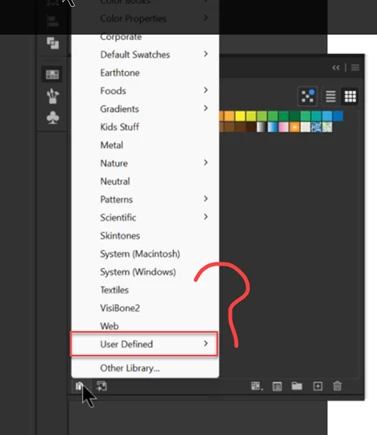
User Defined Colors

  • November 17, 2024
  • 2 replies
  • 654 views

How to make it sure  that  User Defined colors are retained under any circumstances? Because I found that User Defined colors are lost. I do not know when. There were many illustrator crashes & reseting of the computer system.


This topic has been closed for replies.
Correct answer Ton Frederiks

Swatches are just .ai files, you can save them anywhere you want and load them from the swatches panel using Other Library

2 replies

Ton Frederiks
Community Expert
Community Expert
November 17, 2024

If you save a swatches library, you can see where it is saved.

That is the location for your current custom swatches.

See if you can find older ones close to the current directory.

MahaB82A
MahaB82AAuthor
November 17, 2024

Suppose I saved User Defined Colors in a folder in Windows explorer in a compatible format with Ai app. Is there any way to add-in the folder to Ai app if Ai reset takes place.    

Ton Frederiks
Community Expert
Ton FrederiksCommunity ExpertCorrect answer
Community Expert
November 17, 2024

Swatches are just .ai files, you can save them anywhere you want and load them from the swatches panel using Other Library

Monika Gause
Community Expert
Community Expert
November 17, 2024

Use defined libraries can get deleted when you reset the preferences.

It's important to always have backups of them. 


THat said: do you have a permanent backup solution running such as Time Machine (for Apple)?

MahaB82A
MahaB82AAuthor
November 17, 2024

Thanks. I use Windows 11. Is there any easiest way to have a backup in Windows or have I to save color in Ai file format?

Monika Gause
Community Expert
Community Expert
November 17, 2024

I don't know what Windows 11 has built in. Perhaps it can backup your files and system in the same way that Time Machine can. In that case you could grab the old libraries from a backup.