Participant
November 17, 2018
Answered

Using Draw Inside tool for text - edges don't match up

  • November 17, 2018
  • 3 replies
  • 458 views

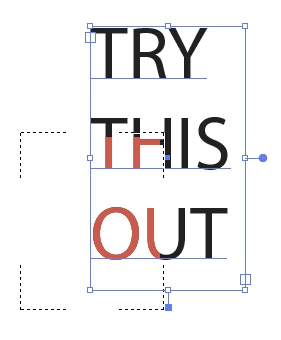
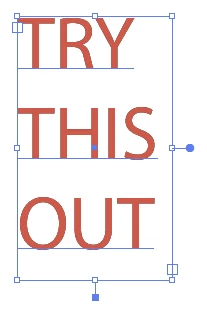
I am trying to make a portion of my text one color and the rest another color, and I'm using the draw inside tool to do this. From the image below, it is evident that the tool is not following the edges of my text correctly. Does anyone know how to fix this problem?

    This topic has been closed for replies.
    Correct answer tromboniator

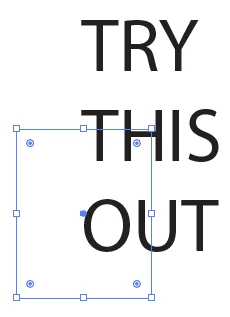
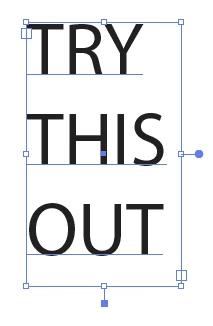
    Set type, copy:

    Change color:

    Cut, draw rectangle:

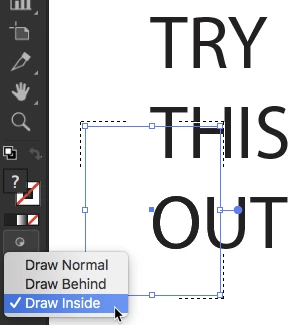
    With rectangle selected, select Draw Inside

    Paste In Place:

    If this is what you already tried, or otherwise doesn't work, let us know and we'll try to find another way.

    Peter

    3 replies

    Monika Gause
    Community Expert
    Community Expert
    November 17, 2018

    Text used as a clipping mask sometimes doesn't match.

    There's not a lot you can do about it.

    To solve your case I would:

    Delete all fills from the text so that it is invisible.

    Then draw inside and first put a black rectangle all over the text to fill it

    Then put the image into the corner.

    That way the masked portion will still be off from the text, but at least you don't see it, because everything is off.

    barbara_a7746676
    Community Expert
    Community Expert
    November 17, 2018

    I'm not able to replicate the problem.

    First check if you have the newest version of Illustrator, version 23.0.1. It is a bug fix that was released about a week ago.

    Do you have a special stroke width profile applied to the text?

    Otherwise, it could be the gpu. Check Preferences > Performance.

    Or you may need to reset preferences. How to set preferences in Illustrator

    Or you may need to uninstall and reinstall using the CC Cleaner tool. Use the Creative Cloud Cleaner Tool to solve installation problems

    tromboniator
    Community Expert
    tromboniatorCommunity ExpertCorrect answer
    Community Expert
    November 17, 2018

    Set type, copy:

    Change color:

    Cut, draw rectangle:

    With rectangle selected, select Draw Inside

    Paste In Place:

    If this is what you already tried, or otherwise doesn't work, let us know and we'll try to find another way.

    Peter

    Participant
    November 19, 2018

    This worked well! Thank you!

    tromboniator
    Community Expert
    Community Expert
    November 19, 2018

    I'm glad. You're welcome!