Mikal Lindoe
Participant
February 11, 2019
Answered

Variable width tool question
  • February 11, 2019
  • 1 reply
  • 367 views

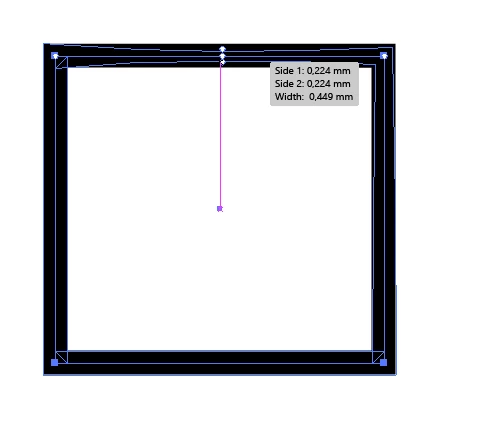
When I try to apply variable witdth to my sqaure the corners of the stroke appear different. The corner that not have the crossing line does not behave like the others when I apply edit the width. Does anyone here know how to fix this. I can not find any settings in AI that will do anything with this.

This topic has been closed for replies.
Correct answer Monika Gause

That happens because it treats the starting point differently. Variable widths can't go round.

You might need to add width points at the corners and adjust them.

And maybe post this on http://illustrator.uservoice.com

1 reply

Monika Gause
Community Expert
Community Expert
February 11, 2019

That one ist the starting point of the rectangle.

In which way does it not do what you want it to?

Mikal Lindoe
Participant
February 12, 2019

It's easier to see when I draw a star. The startingpoint is in lower right corner and as you can see there is a much deeper spilt in that corner. That means it's difficult to make the shape symmetric.

Monika Gause
Community Expert
Monika GauseCommunity ExpertCorrect answer
Community Expert
February 12, 2019

That happens because it treats the starting point differently. Variable widths can't go round.

You might need to add width points at the corners and adjust them.

And maybe post this on http://illustrator.uservoice.com