
Participating Frequently
February 28, 2023
Answered

Various issues since last update.

  • February 28, 2023
  • 1 reply
  • 393 views

Having some seriously annoying problems since the last update.


-Recent artboards have disappeared. Only suggests Adobe templates and will not save my settings. 


-When using duplicate, Illustrator crashes. Every. Single. Time. 


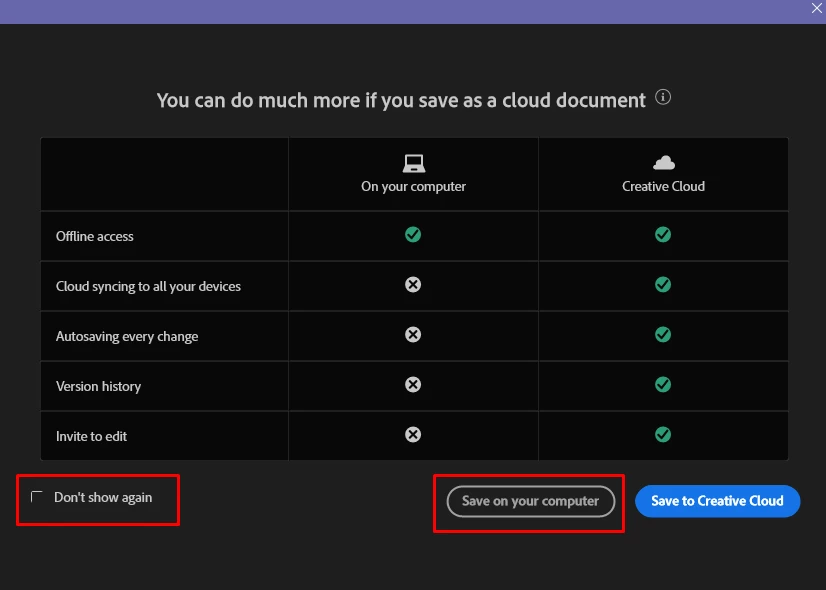
-Saving is now an extra step because it asks me to save to cloud. NO ONE WANTS THIS. Anyone in a proefessional setting already has a file server established and all this has accomplished is slowing down my workflow. 


For the love of god can we please go back to stand alone programs? I'll happily still pay the monethly fee if you stop ruining my day with glitvched updates. 
This topic has been closed for replies.
Correct answer Anubhav M

Hello @DJones13,


We understand that encountering technical issues can be frustrating. We are here to help and would like to suggest trying to reset Illustrator's preferences as described in this article (https://helpx.adobe.com/illustrator/kb/troubleshoot-preference-issues.html) and then checking if you are able to change the default file save location like this:

Disclaimer: Please note that resetting preferences will remove all custom settings, and Illustrator will launch with the defaults. You may save a backup of these settings from the location mentioned in the article.


If Illustrator continues to crash, kindly try 
the suggestions shared in this help article (https://helpx.adobe.com/illustrator/kb/fix-crash-on-launch-issues.html) and check if it helps.

Also, kindly share the crash report by following the steps shared in this help article (https://helpx.adobe.com/illustrator/kb/crash-next-steps.html). While submitting the report, kindly use the same email account used here in the community so we can locate it quickly.


We appreciate your time and effort in helping us resolve this issue.


Looking forward to your response.


Thanks,

Anubhav


Note: Marking correct for visibility.

1 reply

Anubhav M
Community Manager
Anubhav MCommunity ManagerCorrect answer
Community Manager
March 3, 2023

Hello @DJones13,


We understand that encountering technical issues can be frustrating. We are here to help and would like to suggest trying to reset Illustrator's preferences as described in this article (https://helpx.adobe.com/illustrator/kb/troubleshoot-preference-issues.html) and then checking if you are able to change the default file save location like this:

Disclaimer: Please note that resetting preferences will remove all custom settings, and Illustrator will launch with the defaults. You may save a backup of these settings from the location mentioned in the article.


If Illustrator continues to crash, kindly try 
the suggestions shared in this help article (https://helpx.adobe.com/illustrator/kb/fix-crash-on-launch-issues.html) and check if it helps.

Also, kindly share the crash report by following the steps shared in this help article (https://helpx.adobe.com/illustrator/kb/crash-next-steps.html). While submitting the report, kindly use the same email account used here in the community so we can locate it quickly.


We appreciate your time and effort in helping us resolve this issue.


Looking forward to your response.


Thanks,

Anubhav


Note: Marking correct for visibility.