
Participant
September 27, 2021
Question

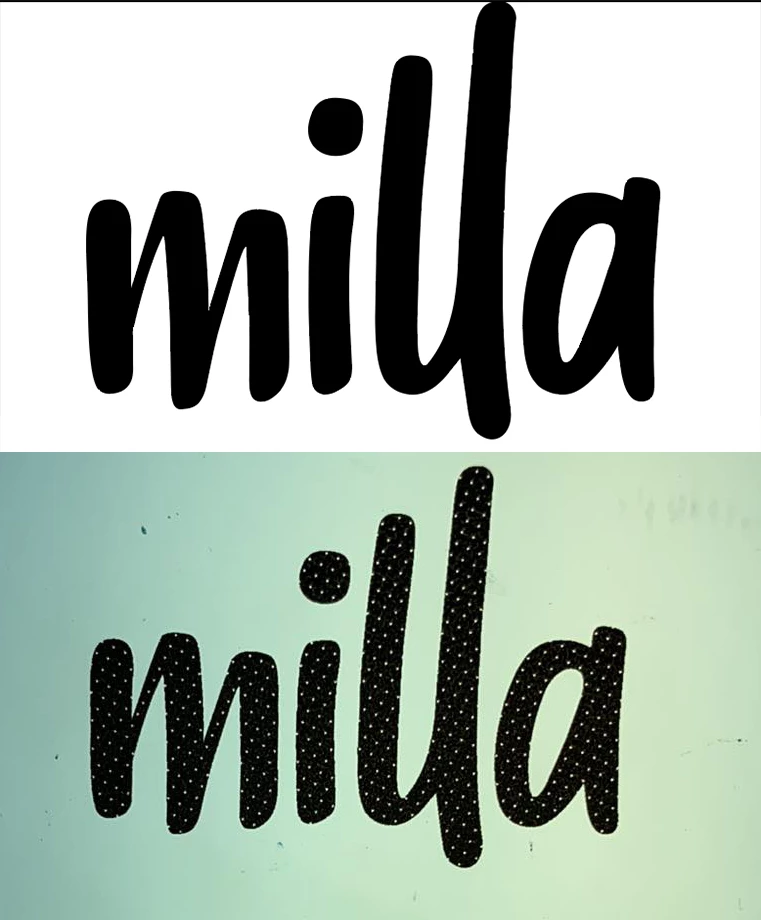
Vector printing with tiny uniform dots through the image

  • September 27, 2021
  • 2 replies
  • 549 views

I can't work out why my vector is printing out with this problem.

It seems to be a setting because documents set up on other computers print out absolutely fine.

Does anyone have any idea?


Top image is digital file

Bottom image is printed
This topic has been closed for replies.

2 replies

manal shanableh
Legend
September 28, 2021

have tried to print it in another printer?? can you show the colors on illustrator? is it 100% black? C0 M0 Y0 K100

or C100 M100 Y100 K100 ?? 

wsJamesAuthor
Participant
September 28, 2021

I've tried printing it another printer with the same result.

It's C0 M0 Y0 K100

Here's a screenshot


Known Participant
September 28, 2021

Is this for a Film output?

Have you tried making a Spot Colour of just 100% K and changing it to that. For some reason your printer is picking up that there are colours other than just Black in this artwork.

Brad @ Roaring Mouse
Community Expert
Community Expert
September 28, 2021

If the same file is printing out differently to the same printer, you have an issue with inconsistent Color settings or printer settings.

What are you printing to?

What colour is specified in the artwork?

etc, etc,

You haven't given un anything really to go on,

wsJamesAuthor
Participant
September 28, 2021

I am printing 100% Black onto an Epsom Stylus Pro 4450.

This has never been a problem before, it's just started happening. This doesn't seem to be an issue with the printer because Files that have been produced on other computers are printing out just fine which leads me to believe it's a colour setting that has been changed.


Here are the colour settings if that's any help.


Brad @ Roaring Mouse
Community Expert
Community Expert
September 28, 2021

Your Color settings seem fine, assuming your file is in CMYK mode

"other computers are printing out just fine"   = this assumes the Printer settings have been specified exactly the same on each machine (in the print dialog... not the actual printer)

Does this exact file print fine from the other machines?

Are your printing directlyfrom Illustrator or from a PDF? If the latter, what does it say your Black is in there (Print Production > Output Preview)?

Can you post a sample file?