
Inspiring
December 9, 2024
Answered

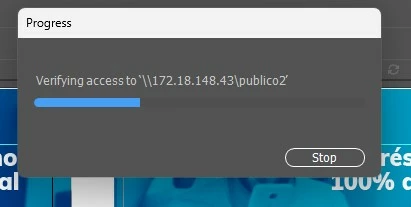
Verifying access to ...

  • December 9, 2024
  • 4 replies
  • 2849 views

I got a file that was shared to me and includes several linked images,
the image previews are shown in the file, and yes the links are broken, but thats not a problem for me.

What im trying is to get rid of some annoying popup that appears every 2 minutes bloking my whole system "Verifiyin access to 'some IP here'", its really frustrating.

Do someone know how to get rid of this popup, setting to avoid illustrator to check this url, or something?
PS: Yes I have found several post here, but no one got a right answer.
PS2: No, I dont have access to that drive, not will ever.
Correct answer Alejandro5FFB

Thank you all !!!
At last! Now in version 29.3 seems to has been fixed!!

4 replies

Alejandro5FFBAuthorCorrect answer
Inspiring
February 12, 2025

Thank you all !!!
At last! Now in version 29.3 seems to has been fixed!!

Ton Frederiks
Community Expert
Community Expert
February 12, 2025

Good to hear that.

Ton Frederiks
Community Expert
Community Expert
December 13, 2024
Monika Gause
Community Expert
Community Expert
December 9, 2024

How is Checking links set up in your Illustrator preferences in File Handling?

Maybe set that to manually?

Inspiring
December 9, 2024

I cannot find where is that setting

Monika Gause
Community Expert
Community Expert
December 9, 2024

"Update Links"

THat is a menu.

Anubhav M
Community Manager
Community Manager
December 9, 2024

Hello @Alejandro5FFB,

Thanks for reaching out. Would you mind copying all the objects/layers from this file to a new one to see if it helps?

Looking forward to hearing from you.


Anubhav

Inspiring
December 9, 2024

I tried that, copied everithing and pasted into a new file and saved.
closed everithing and only load the new file 
2 minutes later, opens the same anoying popup asking to connect to a drive does not exist.